
Table of Contents
IPTV encoder technology has revolutionized media consumption, and choosing the right IPTV encoder encoders is crucial for achieving streaming excellence. This comprehensive guide highlights the Leading IPTV Encoders in the market, featuring advanced solutions like the Vecaster 4K and HD Professional encoders that leverage HEVC and H.265 formats for superior streaming quality.
Whether you’re a streaming service provider seeking to enhance your technical infrastructure or a content creator focusing on seamless delivery, these 4k IPTV encoder solutions offer robust capabilities. You’ll explore models featuring ultra-high-definition resolution, multi-channel functionality, and versatile connectivity options including HDMI and SDI inputs. Premium streaming services rely on these high-performance IPTV encoders to ensure uninterrupted, crystal-clear streaming experiences. Let’s explore the perfect encoder for your streaming requirements!
Vecaster IPTV Encoder
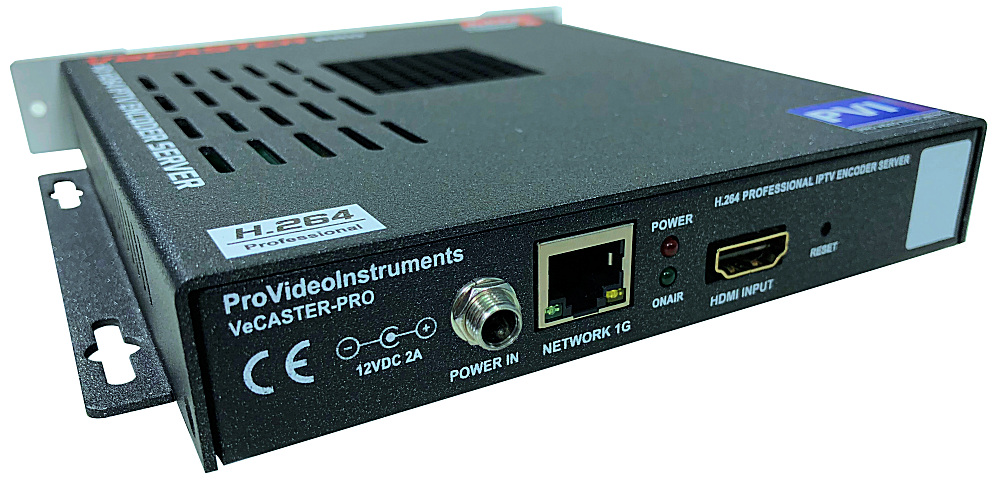
When searching for a dependable IPTV encoder, the Vecaster IPTV Encoder emerges as a standout choice with its exceptional streaming capabilities. Supporting HDMI, 4K, and SDI inputs, it addresses the requirements of both professional broadcasters and casual streamers. Its adaptability and multi-channel support make it an excellent selection for elevating your IPTV streaming performance.
Brand Reputation
Vecaster has established an impressive presence in the IPTV encoder market. Recognized for cutting-edge technology and consistent performance, this brand is preferred by professionals seeking excellence in their encoding solutions. Users can depend on Vecaster’s commitment to delivering systems engineered for durability and optimal performance.
Technology Features
Featuring advanced capabilities designed for high-definition broadcasting, the Vecaster IPTV Encoder guarantees flawless content transmission. Supporting HEVC and H.265 encoding technologies, it delivers premium video quality while optimizing bandwidth consumption.
Furthermore, the encoder’s 16-channel functionality provides extensive flexibility in managing multiple streams, perfect for both live broadcasts and video-on-demand content.
The Vecaster IPTV Encoder incorporates state-of-the-art technology to maximize streaming capabilities. With HDMI and SDI input options, it maintains compatibility with diverse video sources to meet your specific needs.
The 4K support enables stunning visual delivery, while its professional-grade performance meets rigorous broadcasting standards. This encoder enhances both image quality and encoding efficiency, ensuring your audience enjoys smooth, uninterrupted streaming experiences.
HEVC H.265 H.264 Encoder
The HEVC H.265 H.264 IPTV encoder stands as a premier choice for delivering exceptional streaming quality. This advanced technology excels at video compression while preserving remarkable visual fidelity, making it particularly suitable for professional IPTV broadcasting.
Through sophisticated encoding algorithms, users experience enhanced streaming performance with reduced bandwidth demands, especially when implementing solutions like the cutting-edge 4k IPTV encoder from Vecaster.
On sale products
1-month subscription
Original price was: $21.00.$12.00Current price is: $12.00.12-month subscription
Original price was: $79.00.$52.00Current price is: $52.00.24-month subscription
Original price was: $110.00.$92.00Current price is: $92.00.3-month subscription
Original price was: $41.00.$25.00Current price is: $25.00.6-month subscription
Original price was: $49.00.$37.00Current price is: $37.00.

Technical Overview
For those familiar with video encoding fundamentals, HEVC (H.265) delivers an impressive 50% improvement in data compression compared to H.264 technology. This advancement enables the transmission of ultra-high-definition 4K content while consuming minimal bandwidth. The resulting compact file sizes not only optimize network performance but also significantly enhance the viewer’s experience with IPTV encoder encoders.
Streaming Performance
IPTV encoder solutions incorporating HEVC or H.264 technology deliver remarkable streaming capabilities. These sophisticated encoders optimize bandwidth utilization while maintaining superior video quality, perfectly suited for demanding operational scenarios requiring unwavering reliability. Supporting multiple channels, including 16-channel IPTV encoder configurations, these systems enable simultaneous content delivery across various devices without performance degradation.
The performance capabilities of HEVC H.265 encoders are remarkable, facilitating seamless delivery of high-definition and 4K content. Their robust ability to manage multiple streams efficiently, combined with sophisticated error correction mechanisms, ensures minimal disruptions. Additionally, implementing solutions like the Vecaster HDMI to IPTV Encoder substantially enhances your setup, delivering professional-grade quality essential for both live streaming and on-demand broadcasting requirements.
H.265 16ch HDMI Encoder
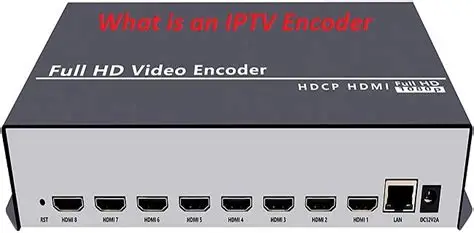
For professional IPTV implementations requiring premium streaming quality, the H.265 16ch HDMI Encoder distinguishes itself through efficient high-definition video compression while managing 16 simultaneous channels.
This professional-grade encoder excels across various applications, from live broadcasting to multimedia presentations, delivering impeccable 4K and HD content. Utilizing advanced HEVC (H.265) technology ensures viewers experience crystal-clear, uninterrupted streaming.
High-Volume Encoding
Broadcasting operations handling substantial video content require a dependable and powerful IPTV encoder. The H.265 16ch HDMI Encoder demonstrates exceptional performance in high-volume encoding scenarios, enabling efficient management of multiple streams while maintaining superior quality. This efficiency optimizes resource utilization while ensuring pristine content delivery to your audience.
Real-World Applications
A key advantage of the H.265 16ch HDMI Encoder lies in its adaptability across diverse industry applications…
The H.265 16ch HDMI IPTV encoder demonstrates exceptional versatility across numerous real-world scenarios, from live event broadcasting to corporate training implementations. This sophisticated encoder enables direct content streaming to your audience, regardless of geographical constraints.
Educational institutions can leverage this technology to deliver immersive learning experiences in real-time, while corporations can facilitate seamless virtual collaborations. Furthermore, sports organizations can broadcast events globally, maintaining exceptional visual quality through the encoder’s advanced 4K and HD capabilities.
Hardware-Based IPTV Encoders
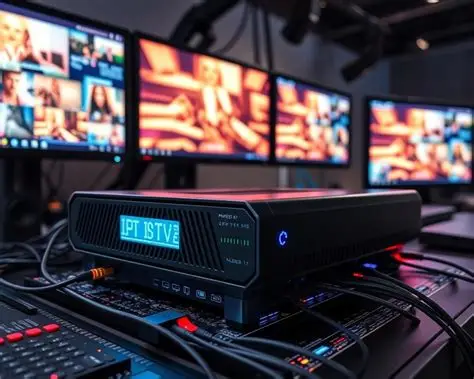
Despite the emergence of software alternatives, hardware-based IPTV encoders continue to dominate professional broadcasting environments, offering unmatched reliability and streaming excellence. These robust units deliver superior processing capabilities, ensuring flawless content encoding with minimal delay.
Whether you’re implementing 4K streams, HD broadcasts, or utilizing various input formats like HDMI and SDI, professional solutions such as the Vecaster IPTV encoder guarantee exceptional content delivery performance.
Design and Usability
Modern hardware-based IPTV encoder encoders incorporate user-centric interfaces, streamlining setup and management processes for operators across all expertise levels. Premium models, including the Vecaster HD and Vecaster 4K, feature sophisticated yet accessible controls and comprehensive monitoring displays, enabling efficient stream performance oversight.
Performance Metrics
For optimal encoding quality, evaluating crucial performance indicators becomes essential in determining your 4k IPTV encoder’s efficiency. Key considerations include compatibility with advanced codecs like HEVC or H.265, encoding latency specifications, and diverse output options, all contributing to delivering superior viewing experiences.
Design considerations encompass both physical specifications and encoding capabilities. The performance metrics of an IPTV encoder are demonstrated through features like multiple HDMI input support and flexible channel configurations, including 16-channel or 4-channel variants.
Critical factors such as streaming efficiency and support for various video resolutions, particularly 4K, ensure consistent broadcast delivery. An encoder’s latency specifications significantly impact viewer interaction and experience quality, especially during live broadcasts.
Cloud-Based IPTV Solutions
The evolution of cloud-based IPTV solutions continues to revolutionize streaming capabilities, delivering unprecedented flexibility, scalability, and performance optimization. Cloud technology enables seamless access to high-quality streams from any location. These advanced solutions support diverse IPTV encoders, ranging from Vecaster systems to professional encoders, facilitating efficient broadcast delivery for both on-demand and live content while minimizing on-site infrastructure requirements.
Flexibility and Accessibility
IPTV solutions deliver exceptional flexibility and accessibility in modern broadcasting environments. Cloud-based infrastructures enable seamless scalability to match varying demands while providing multi-device content access, significantly enhancing viewer convenience. The integration of advanced IPTV encoder encoders like the Vecaster 4K ensures premium-quality streaming capabilities that cater to diverse audience preferences.
Cost-Effectiveness
Implementing IPTV solutions substantially reduces operational expenses while optimizing viewer experiences. Cloud infrastructure adoption minimizes the necessity for extensive hardware investments and ongoing maintenance costs typically associated with conventional broadcasting setups. This allows organizations to direct resources toward premium iptv encoder equipment like the Vecaster HD, ensuring superior stream performance and quality delivery.
The adaptability of cloud-based IPTV solutions enables swift responses to audience requirements without substantial capital investments. By implementing scalable 4k iptv encoder systems and efficient cloud storage solutions, organizations can minimize operational costs while maintaining focus on content excellence and viewer satisfaction.
This cost-efficient approach facilitates seamless technology upgrades and adoption of cutting-edge 4K capabilities, maintaining competitive content delivery standards.
Multi-Channel Encoding Options
When evaluating an IPTV encoder, multi-channel encoding capabilities become crucial considerations. Professional encoding solutions, including the Vecaster series, accommodate up to 16 simultaneous channels, enabling efficient multi-source video streaming. This functionality proves essential for organizations aiming to maximize broadcasting potential, delivering seamless viewing experiences across multiple channels in both HD and 4K resolutions.
Scalability Features
Multi-channel encoders’ scalability capabilities represent a critical consideration. Selecting an IPTV encoder that supports straightforward channel additions or upgrades ensures long-term operational flexibility. This approach enables gradual infrastructure expansion without complete system replacement, promoting cost-effective scaling strategies.
Use Cases
Multi-channel functionality suits diverse applications, from live event coverage to corporate communications and educational content delivery. These encoding solutions enable efficient content management and distribution across multiple platforms, enhancing audience engagement through varied programming options.
Furthermore, implementing a 16-channel IPTV encoder maximizes viewer reach through simultaneous broadcast capabilities. Whether delivering HD or 4K content, this solution excels in live sports broadcasting, enabling multiple camera angle streams.
Organizations can utilize these features for digital signage or multi-site broadcasts, enabling centralized content management while maintaining superior streaming quality. Selecting professional IPTV encoder solutions like the Vecaster HD series optimizes operational efficiency and enhances viewer satisfaction levels.
Encoding Compliance Standards
In today’s dynamic IPTV landscape, maintaining strict encoding compliance standards remains crucial for delivering premium broadcast quality. Your selected iptv encoder, whether a professional HDMI, 4k iptv encoder, or SDI solution, must align with established protocols like MPEG-DASH and HLS to ensure seamless device compatibility. Such compliance enhances viewer experiences while maximizing content accessibility across platforms.
Industry Relevance
The importance of encoding compliance extends beyond technical specifications into the realm of industry partnerships. Content providers consistently prioritize collaborations with services demonstrating strict adherence to these standards. By implementing compliant iptv encoder encoders, organizations can foster stronger industry relationships while building enhanced viewer trust in their streaming capabilities.
Future Trends
Emerging technologies like HEVC (H.265) encoding and advanced compression methodologies are reshaping IPTV solution development. The increasing demand for 4K content delivery necessitates staying current with encoder technologies supporting these formats while maintaining exceptional quality across viewing devices.
Consider the emergence of innovative encoding solutions, including AI-powered optimization and real-time encoding analytics. These advancements enable delivery of superior quality streams while significantly reducing bandwidth requirements.
As viewer preferences increasingly favor ultra-high-definition content, investing in professional 4k iptv encoder solutions ensures competitive positioning and future-ready capabilities aligned with evolving audience demands.
User-Friendly Encoders
Selecting an appropriate IPTV encoder significantly enhances broadcasting capabilities, particularly when prioritizing user-friendly models. These solutions streamline the broadcasting process, accommodating both novice users and experienced professionals. Through intuitive functionality, simplified setup processes, and reliable performance metrics, broadcasters can focus on content delivery without technical complications.
Setup Simplicity
Leading user-friendly IPTV encoders feature streamlined integration processes with efficient setup protocols. Many devices incorporate plug-and-play functionality, eliminating complex configuration requirements. This enables nearly immediate streaming capabilities while minimizing installation timeframes.
Interface Design
Contemporary user interfaces, even in advanced IPTV encoders including 16-channel solutions and 4K models, provide intuitive, visually optimized layouts. Users can efficiently manage configurations, monitor streaming performance, and access advanced features through simplified control mechanisms.
To optimize your streaming experience, evaluate the encoder’s interface design and operational functionality. Modern iptv encoder systems feature sophisticated yet user-friendly interfaces with accessible menus, responsive controls, and high-quality touchscreen displays, enabling swift configuration adjustments.
Advanced solutions like professional iptv encoder encoders incorporate intuitive software platforms that enhance navigation and streamline system management, particularly beneficial for live broadcasting applications. Your audience will recognize the enhanced professionalism delivered through encoders that balance sophisticated design with exceptional performance capabilities.
High-Performance Streaming Encoders
Transform your IPTV streaming capabilities with advanced performance encoders designed for superior quality output and consistent reliability. These sophisticated 4k iptv encoder solutions, available in both HDMI and ultra-high-definition configurations, support diverse format compatibility and resolution options, delivering unprecedented broadcasting flexibility. Their comprehensive feature sets make them particularly suitable for professional environments, ensuring your viewers experience uninterrupted, high-quality content delivery.
Low Latency
Premium IPTV encoders prioritize minimal latency, essential for professional live streaming applications. Through advanced processing capabilities that reduce transmission delays between content capture and broadcast delivery, these systems optimize viewer engagement and satisfaction, particularly crucial for sports events and real-time broadcasts.
Robust Output
Leading IPTV encoders distinguish themselves through exceptional output capabilities, maintaining broadcast integrity across diverse streaming scenarios. This fundamental feature ensures consistent high-quality content delivery across multiple platforms, enabling broader audience reach while maintaining optimal performance standards.
Robust output functionality in professional IPTV encoders ensures consistently superior quality, delivering crystal-clear visuals and pristine audio to your audience. Advanced systems like professional encoder solutions enable reliable performance across multiple broadcasting channels, supporting scalable operations.
Integration of advanced compression technologies enhances viewer experiences, ensuring smooth content delivery even at premium resolutions. This powerful combination of quality assurance and dependable performance establishes these encoders as essential tools for professional broadcasting applications.
Budget-Friendly IPTV Options
Discover cost-effective IPTV solutions that deliver professional-grade quality without excessive investment. From economical HDMI devices to affordable 4K encoding solutions, various options accommodate diverse broadcasting requirements. Industry-leading brands provide dependable performance across multiple channels, simplifying high-quality content streaming while maintaining budget consciousness.
Value for Money
Value optimization remains crucial when selecting an IPTV encoder. Your investment should deliver exceptional performance, particularly when considering professional-grade encoding solutions for content streaming applications.
Essential Features
While options abound, focus on critical encoder functionality that aligns with your requirements. Prioritize essential characteristics including superior video quality, comprehensive multichannel support, and reliable streaming capabilities. These fundamental elements ensure your selected solution not only meets immediate needs but delivers sustained long-term value.
A reliable IPTV encoder should support diverse formats including HEVC and H.265, ensuring exceptional streaming quality across both HD and 4K resolutions. Modern HDMI connectivity facilitates seamless integration, while advanced multi-channel capabilities exemplified by the Vecaster 16 channel system expand your broadcasting potential.
Select manufacturers offering comprehensive technical support and regular firmware updates, such as the Vecaster HD professional line, to maintain optimal encoder performance.
Professional-Grade Encoders
Professional-grade iptv encoder solutions represent essential equipment for content creators and broadcasters seeking superior streaming quality. These sophisticated devices deliver pristine high-definition and ultra-high-definition output, ensuring your audience experiences exceptional video clarity.
Featuring comprehensive multi-channel support and cutting-edge compression technologies like HEVC/H.265, these 4k iptv encoder systems address the sophisticated requirements of , representing a strategic investment for professional streaming operations. modern IPTV providers
Advanced Tech Specs
Professional iptv encoder encoders distinguish themselves through comprehensive technical specifications. Essential features include:
- Resolution: 4K, HD, Ultra HD
- Channels: Up to 16 channels
- Input Interfaces: HDMI, SDI
- Compression Standard: HEVC, H.265
- Streaming Protocols: RTSP, HLS
Target Audience
Professional-grade IPTV encoders serve specific market segments effectively. Broadcasting professionals, sports content providers, and live event streaming specialists particularly benefit from these advanced systems. Content creators prioritizing superior video quality leverage these devices to deliver polished, professional broadcasts.
This demographic encompasses broadcasting professionals, event organizers, and content producers who depend on premium encoders for delivering exceptional stream quality.
Advanced features including multi-channel support, superior resolution capabilities, and sophisticated compression algorithms establish professional IPTV encoders as crucial components in modern streaming setups. This technology enables delivery of an unparalleled viewing experience to your audience.
Over-the-Top Encoding Solutions
Modern IPTV professionals increasingly adopt over-the-top (OTT) encoding platforms for enhanced versatility and performance. These solutions provide comprehensive media streaming capabilities, enabling broad audience reach across diverse devices without dedicated hardware requirements. Solutions including Vecaster and HDMI encoders support both 4K and HD broadcasting, meeting contemporary viewing standards.
Compatibility
Encoding solution compatibility remains crucial for seamless integration. Whether implementing an HDMI encoder or SDI configuration, ensure your selected system integrates effectively with existing infrastructure. Consider support for industry-standard protocols, streaming formats, and operating system compatibility to maintain broadcasting excellence.
Innovative Features
Beyond compatibility, modern iptv encoder encoders incorporate innovative features that revolutionize streaming capabilities. Leveraging advanced HEVC (H.265) compression technology, these systems deliver superior quality while optimizing bandwidth usage.
Features like real-time transcoding and adaptive bitrate streaming ensure content accessibility across diverse devices and network conditions. Every component in these sophisticated 4k iptv encoder systems, from multi-channel functionality to intuitive user interfaces, elevates your IPTV service delivery.
Vecaster’s comprehensive toolkit provides access to features that optimize workflow efficiency and output quality. Their 4K and HDMI solutions, whether utilizing a 16-channel iptv encoder or the Vecaster Professional IP encoder, facilitate seamless high-quality content delivery. These systems include integrated streaming capabilities supporting multiple formats, enabling broad audience reach across various platforms and networks.
Recommendations for Beginners
For newcomers, selecting an appropriate IPTV encoder can seem overwhelming. Focus on user-friendly, versatile options that facilitate learning fundamental operations before exploring advanced features. Established brands like Vecaster provide comprehensive support and educational resources specifically designed for newcomers entering the IPTV encoding landscape.
Simplified Choices
New users should prioritize encoders offering straightforward operation. Solutions like the Vecaster HDMI to IPTV encoder feature simplified setup processes and clear interfaces, enabling quick streaming implementation without extensive technical expertise.
Basic Features
Essential encoder features include HD or 4K support, multi-channel capabilities, and broad streaming format compatibility. These core functionalities ensure high-quality content production without complicated configuration requirements.
Fundamental IPTV encoder characteristics significantly impact streaming performance. Seek solutions supporting HDMI and SDI inputs for versatile device connectivity. Verify HEVC/H.265 format compatibility, ensuring efficient video compression while maintaining superior quality at reduced bitrates.
User-friendly interfaces combined with multi-channel output capabilities enhance content management, allowing seamless source handling. Selecting encoders balancing professional-grade performance with accessibility ensures productive IPTV encoding implementation.
Advanced Encoders for Experts
Professional users understand that selecting appropriate IPTV encoders significantly impacts streaming quality and operational efficiency. Consider these advanced encoding solutions designed for professional applications:
- Vecaster 4K IPTV Encoder
- Professional HDMI to IPTV Encoder
- 16 Channel IPTV Encoder
- VECASTER SDI Encoder
- High-Performance IPTV Encoder HD
Features
Specifications
4K Video Support: Included
HDMI Input: Integrated
Multi-Channel Output: Maximum 16 Channels
HEVC Encoding: Compatible
In-Depth Capabilities
A professional 4k iptv encoder comes equipped with comprehensive functionalities enabling complete streaming customization, including multi-channel outputs, versatile input options such as HDMI and SDI, and HEVC encoding support delivering superior compression and visual quality. Mastering these features helps optimize your IPTV streaming configurations effectively.
Niche Applications
Modern iptv encoder encoders demonstrate remarkable versatility across specialized broadcasting and streaming scenarios. These applications encompass educational content delivery, corporate streaming platforms, and professional sports broadcasting. Each implementation harnesses the encoders’ capabilities to address specific viewer requirements.
A high-performance iptv encoder proves invaluable for specialized applications like live sports broadcasting, where minimal latency and real-time quality are essential. Additionally, educational institutions leverage these encoders for distance learning to enhance student engagement.
For corporate communications, these systems deliver crystal-clear content while maintaining consistent performance. These specialized encoders provide advantages in delivering dependable streaming experiences while meeting content distribution objectives.
Performance Comparison
Understanding that IPTV encoder performance varies considerably based on technical specifications and capabilities, the following comparison table highlights important performance indicators.
Encoder Model
Performance Metrics
Vecaster 4K: Ultra HD support, 16-channel encoding
HDMI IPTV Encoder: Full HD quality, consistent streaming
Vecaster HD: Enterprise-grade performance, H.265 compatibility
Key Metrics
Essential considerations when evaluating IPTV encoders include resolution support, compression standards like H.265 (HEVC), and simultaneous channel management capabilities. These factors ensure optimal streaming quality while maximizing utilization.IPTV bandwidth
Category Insights
Performance capabilities typically align with additional features present in your selected IPTV encoder. Choosing an encoder with premium features like Vecaster’s Ultra HD support or extensive channel capacity ensures enhanced flexibility and superior streaming quality and reliability.
This insight is crucial, as each iptv encoder brings unique capabilities to the table. The Vecaster series exemplifies this diversity with multiple models designed for specific requirements, particularly in terms of SDI or HDMI connections. Selecting an encoder that supports multiple channels significantly expands your content delivery potential. Pay special attention to encoders featuring HEVC compatibility, as these deliver superior streaming quality while optimizing bandwidth usage. Your selection will substantially impact the overall quality and reliability of your IPTV broadcasts.
Customer Reviews and Feedback
An analysis of various iptv encoder encoders reveals that user feedback plays a crucial role in determining the most suitable device for specific needs. Users frequently emphasize features like 4K resolution capabilities and multiple channel support as decisive factors. While some users report occasional connection stability challenges, the general consensus reflects satisfaction with user-friendly interfaces and straightforward setup processes. The Vecaster brand, in particular, receives consistent praise for their professional-grade encoders.
User Experiences
User testimonials demonstrate diverse experiences with 4k iptv encoder systems. Many users highlight the exceptional high-definition quality delivered by models such as the Vecaster 4K, particularly noting its efficient HDMI to IPTV conversion capabilities. The responsive technical support and active user community surrounding these encoders receive frequent mention, particularly in addressing setup-related queries. Users consistently report enhanced viewing experiences with these devices.
Popular Opinions
Across various review platforms and discussion forums, conversations about IPTV encoders consistently emphasize the importance of choosing a reliable brand. Users generally concur that encoders featuring SDI inputs and HEVC compatibility deliver superior video quality. Frequent references to Vecaster indicate their models’ popularity in both residential and professional applications. User comments often highlight the importance of flexible channel configurations, confirming versatility as a key consideration.
The consensus in popular opinion clearly indicates the value of investing in an IPTV encoder aligned with your streaming requirements. Users frequently commend the Vecaster HD encoder for its intuitive setup process and HDMI versatility. While some users report latency issues with budget models, investing in professional-grade equipment often prevents future streaming complications. The positive reception of 4-channel and 16-channel variants underscores their effectiveness in managing extensive broadcasting requirements, contributing to comprehensive user satisfaction.
Industry Expert Opinions
Industry experts unanimously emphasize that selecting an appropriate IPTV encoder is crucial for delivering premium streaming quality. With diverse specifications including HDMI, SDI, and multi-channel capabilities, each iptv encoder offers unique advantages tailored to specific requirements. Industry professionals frequently recommend the Vecaster series for its advanced 4K capabilities and HEVC support, ensuring exceptional video quality. Understanding market insights will help you make well-informed choices while exploring the diverse IPTV ecosystem.
Professional Reviews
For those requiring reliable guidance, expert reviews showcase leading models including the Vecaster HD and 16 channel IPTV encoder. These comprehensive evaluations typically analyze performance metrics, setup simplicity, and real-world applications, offering you detailed insights into functionality and potential limitations.
Recommendations
Evidently, choosing a professional 4k iptv encoder requires thorough evaluation based on your streaming requirements. Focus on encoders featuring cutting-edge capabilities that guarantee superior streaming quality, such as the Vecaster HD and 4K options. These solutions have earned recognition for their consistent performance and dependability.
With advanced iptv encoder encoders like the Vecaster 4K and the Vecaster HD, you’ll experience superior video quality before streaming, essential for delivering exceptional viewer experiences. These devices offer expandability, enabling seamless channel addition when needed. Remember that models incorporating HEVC, like the Vecaster HEVC encoder, enhance streaming efficiency while reducing bandwidth requirements. Matching features with your specific needs ensures optimal value and performance for your IPTV infrastructure.
Trends in IPTV Encoding
Beyond the growing demand for high-quality streaming, IPTV encoding continues to experience remarkable technological progress. Advanced compression techniques, including HEVC, are revolutionizing video quality delivery while optimizing bandwidth usage. As streaming platforms evolve, expect increased adoption of encoders supporting 4K and HDR capabilities, ensuring premium content delivery to your audience. This progression highlights the importance of adaptable and efficient encoding solutions addressing evolving media consumption patterns.
Emerging Technologies
For those monitoring industry developments, numerous innovative technologies are revolutionizing IPTV encoding. AI and machine learning integration is enhancing bitrate management and adaptive streaming capabilities. Products like the Vecaster 4K IPTV Encoder are pioneering these advancements, improving encoding efficiency while supporting various streaming formats. This innovation is essential for maintaining competitiveness in today’s dynamic digital landscape.
Market Demand
As online streaming continues its exponential growth, the requirement for robust IPTV encoders becomes increasingly critical. High-definition content consumption is expanding rapidly, requiring solutions that meet viewer expectations. The market demands professional and versatile solutions, such as the 16 Channel IPTV Encoder and Vecaster HD series, to enable smooth multi-channel broadcasting and premium experiences, guaranteeing viewer satisfaction and retention.
It’s crucial to recognize that the demand for efficient IPTV encoder solutions continues to surge, driven by expanding subscriber bases and the transition towards advanced 4K and HEVC standards. Your focus should be on selecting iptv subscription encoder encoders capable of delivering premium streaming quality with minimal latency, as modern viewers expect instantaneous and seamless content access. By prioritizing features such as multi-channel capabilities and format versatility, you’ll significantly enhance your service offerings to meet evolving consumer demands in today’s dynamic market.
Future-Proof Encoding Solutions
As streaming technologies rapidly advance, ensuring your IPTV system is future-ready becomes essential. With the continuous evolution of 4K iptv and HEVC formats, investing in professional 4k iptv encoder solutions like the Vecaster 4K HDMI or Vecaster HD ensures your content remains competitive and valuable. Choosing high-performance encoding solutions today safeguards your broadcast relevance and maintains viewer engagement for years to come.
Networking Considerations
Key considerations for your IPTV infrastructure include efficient bandwidth management and latency optimization. A robust network foundation is crucial for delivering premium streams, particularly when implementing encoders like the Vecaster HDMI to IPTV Encoder or 16 Channel IPTV Encoder. Ensure proper bandwidth allocation and consider implementing SDI professional encoders to minimize latency for uninterrupted transmission.
Investment Worthiness
When evaluating investment options for IPTV encoders, prioritizing quality and future capabilities remains paramount. While encoders like the Vecaster HD or Vecaster 4K HDMI may require higher initial investment, the long-term advantages in stream quality, content accessibility, and adaptability to emerging technologies justify the cost.
To evaluate investment worthiness, consider both initial expenses and content scalability potential. Selecting advanced models like the Vecaster HEVC or 16 Channel IPTV Encoder positions you ahead of market trends. These encoders efficiently manage multiple channels while supporting high-definition streaming, substantially enhancing your service appeal. Your investment yields returns through meeting increasing consumer demand for premium, diverse content while adapting to future technological advancements.
Top Event Streaming Encoders
Different streaming encoders offer varying performance levels for live events. Selecting the appropriate IPTV encoder significantly impacts your broadcast quality, viewer engagement, and system reliability. The Vecaster series, including the Vecaster 4K HDMI and Vecaster SDI, delivers exceptional features for professional event streaming, ensuring immersive viewer experiences.
Live Broadcasting Capabilities
To maximize your event reach with exceptional clarity, choosing an IPTV encoder with superior live broadcasting capabilities is essential. Models like the Vecaster HD and 4K encoder options deliver premium quality output, enabling you to present content with stunning detail and enhance viewer satisfaction.
Audience Engagement
Modern IPTV encoder solutions enhance interactive streaming experiences significantly. Advanced iptv encoder encoders feature real-time viewer interaction tools, integrated chat systems, and comprehensive sharing capabilities, fostering dynamic online communities. Whether using a standard or 4k iptv encoder, these engagement features help cultivate dedicated viewership and strengthen audience connections.