Best IPTV Encoders of 2025: Complete Buying Guide and Expert Reviews

iptv encoder

IPTV encoder technology has revolutionized media consumption, and choosing the right IPTV encoder encoders is crucial for achieving streaming excellence. This comprehensive guide highlights the Leading IPTV Encoders in the market, featuring advanced solutions like the Vecaster 4K and HD Professional encoders that leverage HEVC and H.265 formats for superior streaming quality.

Whether you’re a streaming service provider seeking to enhance your technical infrastructure or a content creator focusing on seamless delivery, these 4k IPTV encoder solutions offer robust capabilities. You’ll explore models featuring ultra-high-definition resolution, multi-channel functionality, and versatile connectivity options including HDMI and SDI inputs. Premium streaming services rely on these high-performance IPTV encoders to ensure uninterrupted, crystal-clear streaming experiences. Let’s explore the perfect encoder for your streaming requirements!

Vecaster IPTV Encoder
iptv encoder

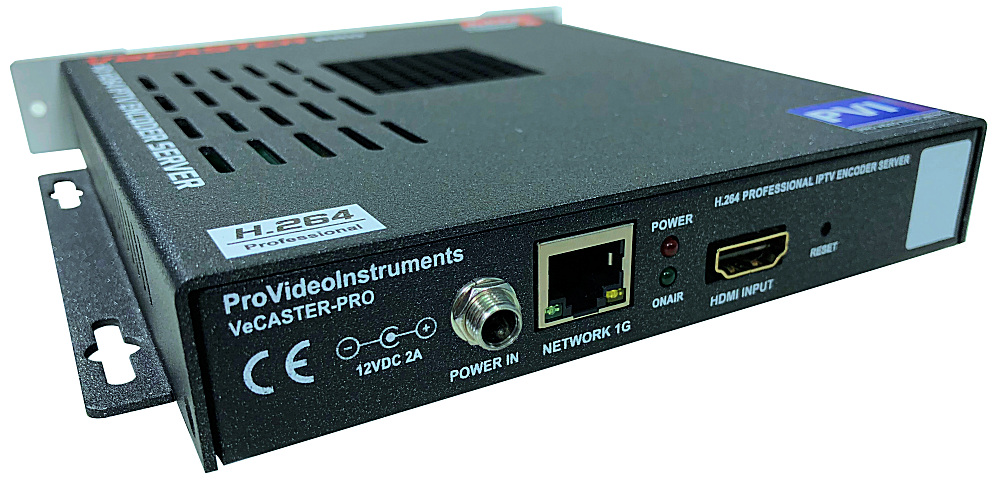
When searching for a dependable IPTV encoder, the Vecaster IPTV Encoder emerges as a standout choice with its exceptional streaming capabilities. Supporting HDMI, 4K, and SDI inputs, it addresses the requirements of both professional broadcasters and casual streamers. Its adaptability and multi-channel support make it an excellent selection for elevating your IPTV streaming performance.

Brand Reputation

Vecaster has established an impressive presence in the IPTV encoder market. Recognized for cutting-edge technology and consistent performance, this brand is preferred by professionals seeking excellence in their encoding solutions. Users can depend on Vecaster’s commitment to delivering systems engineered for durability and optimal performance.

Technology Features

Featuring advanced capabilities designed for high-definition broadcasting, the Vecaster IPTV Encoder guarantees flawless content transmission. Supporting HEVC and H.265 encoding technologies, it delivers premium video quality while optimizing bandwidth consumption.

Furthermore, the encoder’s 16-channel functionality provides extensive flexibility in managing multiple streams, perfect for both live broadcasts and video-on-demand content.

The Vecaster IPTV Encoder incorporates state-of-the-art technology to maximize streaming capabilities. With HDMI and SDI input options, it maintains compatibility with diverse video sources to meet your specific needs.

The 4K support enables stunning visual delivery, while its professional-grade performance meets rigorous broadcasting standards. This encoder enhances both image quality and encoding efficiency, ensuring your audience enjoys smooth, uninterrupted streaming experiences.

HEVC H.265 H.264 Encoder

The HEVC H.265 H.264 IPTV encoder stands as a premier choice for delivering exceptional streaming quality. This advanced technology excels at video compression while preserving remarkable visual fidelity, making it particularly suitable for professional IPTV broadcasting.

Through sophisticated encoding algorithms, users experience enhanced streaming performance with reduced bandwidth demands, especially when implementing solutions like the cutting-edge 4k IPTV encoder from Vecaster.

On sale products

Technical Overview

For those familiar with video encoding fundamentals, HEVC (H.265) delivers an impressive 50% improvement in data compression compared to H.264 technology. This advancement enables the transmission of ultra-high-definition 4K content while consuming minimal bandwidth. The resulting compact file sizes not only optimize network performance but also significantly enhance the viewer’s experience with IPTV encoder encoders.

Streaming Performance

IPTV encoder solutions incorporating HEVC or H.264 technology deliver remarkable streaming capabilities. These sophisticated encoders optimize bandwidth utilization while maintaining superior video quality, perfectly suited for demanding operational scenarios requiring unwavering reliability. Supporting multiple channels, including 16-channel IPTV encoder configurations, these systems enable simultaneous content delivery across various devices without performance degradation.

The performance capabilities of HEVC H.265 encoders are remarkable, facilitating seamless delivery of high-definition and 4K content. Their robust ability to manage multiple streams efficiently, combined with sophisticated error correction mechanisms, ensures minimal disruptions. Additionally, implementing solutions like the Vecaster HDMI to IPTV Encoder substantially enhances your setup, delivering professional-grade quality essential for both live streaming and on-demand broadcasting requirements.

H.265 16ch HDMI Encoder

For professional IPTV implementations requiring premium streaming quality, the H.265 16ch HDMI Encoder distinguishes itself through efficient high-definition video compression while managing 16 simultaneous channels.

This professional-grade encoder excels across various applications, from live broadcasting to multimedia presentations, delivering impeccable 4K and HD content. Utilizing advanced HEVC (H.265) technology ensures viewers experience crystal-clear, uninterrupted streaming.

High-Volume Encoding

Broadcasting operations handling substantial video content require a dependable and powerful IPTV encoder. The H.265 16ch HDMI Encoder demonstrates exceptional performance in high-volume encoding scenarios, enabling efficient management of multiple streams while maintaining superior quality. This efficiency optimizes resource utilization while ensuring pristine content delivery to your audience.

Real-World Applications

A key advantage of the H.265 16ch HDMI Encoder lies in its adaptability across diverse industry applications…

The H.265 16ch HDMI IPTV encoder demonstrates exceptional versatility across numerous real-world scenarios, from live event broadcasting to corporate training implementations. This sophisticated encoder enables direct content streaming to your audience, regardless of geographical constraints.

Educational institutions can leverage this technology to deliver immersive learning experiences in real-time, while corporations can facilitate seamless virtual collaborations. Furthermore, sports organizations can broadcast events globally, maintaining exceptional visual quality through the encoder’s advanced 4K and HD capabilities.

Hardware-Based IPTV Encoders
iptv encoder

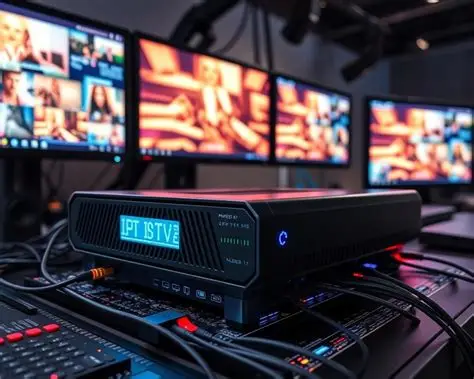
Despite the emergence of software alternatives, hardware-based IPTV encoders continue to dominate professional broadcasting environments, offering unmatched reliability and streaming excellence. These robust units deliver superior processing capabilities, ensuring flawless content encoding with minimal delay.

Whether you’re implementing 4K streams, HD broadcasts, or utilizing various input formats like HDMI and SDI, professional solutions such as the Vecaster IPTV encoder guarantee exceptional content delivery performance.

Design and Usability

Modern hardware-based IPTV encoder encoders incorporate user-centric interfaces, streamlining setup and management processes for operators across all expertise levels. Premium models, including the Vecaster HD and Vecaster 4K, feature sophisticated yet accessible controls and comprehensive monitoring displays, enabling efficient stream performance oversight.

Performance Metrics

For optimal encoding quality, evaluating crucial performance indicators becomes essential in determining your 4k IPTV encoder’s efficiency. Key considerations include compatibility with advanced codecs like HEVC or H.265, encoding latency specifications, and diverse output options, all contributing to delivering superior viewing experiences.

Design considerations encompass both physical specifications and encoding capabilities. The performance metrics of an IPTV encoder are demonstrated through features like multiple HDMI input support and flexible channel configurations, including 16-channel or 4-channel variants.

Critical factors such as streaming efficiency and support for various video resolutions, particularly 4K, ensure consistent broadcast delivery. An encoder’s latency specifications significantly impact viewer interaction and experience quality, especially during live broadcasts.

Cloud-Based IPTV Solutions
encoder iptv

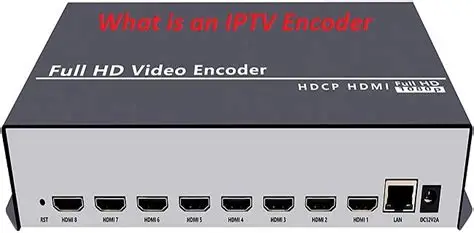
The evolution of cloud-based IPTV solutions continues to revolutionize streaming capabilities, delivering unprecedented flexibility, scalability, and performance optimization. Cloud technology enables seamless access to high-quality streams from any location. These advanced solutions support diverse IPTV encoders, ranging from Vecaster systems to professional encoders, facilitating efficient broadcast delivery for both on-demand and live content while minimizing on-site infrastructure requirements.

Flexibility and Accessibility

IPTV solutions deliver exceptional flexibility and accessibility in modern broadcasting environments. Cloud-based infrastructures enable seamless scalability to match varying demands while providing multi-device content access, significantly enhancing viewer convenience. The integration of advanced IPTV encoder encoders like the Vecaster 4K ensures premium-quality streaming capabilities that cater to diverse audience preferences.

Cost-Effectiveness

Implementing IPTV solutions substantially reduces operational expenses while optimizing viewer experiences. Cloud infrastructure adoption minimizes the necessity for extensive hardware investments and ongoing maintenance costs typically associated with conventional broadcasting setups. This allows organizations to direct resources toward premium iptv encoder equipment like the Vecaster HD, ensuring superior stream performance and quality delivery.

The adaptability of cloud-based IPTV solutions enables swift responses to audience requirements without substantial capital investments. By implementing scalable 4k iptv encoder systems and efficient cloud storage solutions, organizations can minimize operational costs while maintaining focus on content excellence and viewer satisfaction.

This cost-efficient approach facilitates seamless technology upgrades and adoption of cutting-edge 4K capabilities, maintaining competitive content delivery standards.

Multi-Channel Encoding Options

When evaluating an IPTV encoder, multi-channel encoding capabilities become crucial considerations. Professional encoding solutions, including the Vecaster series, accommodate up to 16 simultaneous channels, enabling efficient multi-source video streaming. This functionality proves essential for organizations aiming to maximize broadcasting potential, delivering seamless viewing experiences across multiple channels in both HD and 4K resolutions.

Scalability Features

Multi-channel encoders’ scalability capabilities represent a critical consideration. Selecting an IPTV encoder that supports straightforward channel additions or upgrades ensures long-term operational flexibility. This approach enables gradual infrastructure expansion without complete system replacement, promoting cost-effective scaling strategies.

Use Cases

Multi-channel functionality suits diverse applications, from live event coverage to corporate communications and educational content delivery. These encoding solutions enable efficient content management and distribution across multiple platforms, enhancing audience engagement through varied programming options.

Furthermore, implementing a 16-channel IPTV encoder maximizes viewer reach through simultaneous broadcast capabilities. Whether delivering HD or 4K content, this solution excels in live sports broadcasting, enabling multiple camera angle streams.

Organizations can utilize these features for digital signage or multi-site broadcasts, enabling centralized content management while maintaining superior streaming quality. Selecting professional IPTV encoder solutions like the Vecaster HD series optimizes operational efficiency and enhances viewer satisfaction levels.

Encoding Compliance Standards

In today’s dynamic IPTV landscape, maintaining strict encoding compliance standards remains crucial for delivering premium broadcast quality. Your selected iptv encoder, whether a professional HDMI, 4k iptv encoder, or SDI solution, must align with established protocols like MPEG-DASH and HLS to ensure seamless device compatibility. Such compliance enhances viewer experiences while maximizing content accessibility across platforms.

Industry Relevance

The importance of encoding compliance extends beyond technical specifications into the realm of industry partnerships. Content providers consistently prioritize collaborations with services demonstrating strict adherence to these standards. By implementing compliant iptv encoder encoders, organizations can foster stronger industry relationships while building enhanced viewer trust in their streaming capabilities.

Emerging technologies like HEVC (H.265) encoding and advanced compression methodologies are reshaping IPTV solution development. The increasing demand for 4K content delivery necessitates staying current with encoder technologies supporting these formats while maintaining exceptional quality across viewing devices.

Consider the emergence of innovative encoding solutions, including AI-powered optimization and real-time encoding analytics. These advancements enable delivery of superior quality streams while significantly reducing bandwidth requirements.

As viewer preferences increasingly favor ultra-high-definition content, investing in professional 4k iptv encoder solutions ensures competitive positioning and future-ready capabilities aligned with evolving audience demands.

User-Friendly Encoders

Selecting an appropriate IPTV encoder significantly enhances broadcasting capabilities, particularly when prioritizing user-friendly models. These solutions streamline the broadcasting process, accommodating both novice users and experienced professionals. Through intuitive functionality, simplified setup processes, and reliable performance metrics, broadcasters can focus on content delivery without technical complications.

Setup Simplicity

Leading user-friendly IPTV encoders feature streamlined integration processes with efficient setup protocols. Many devices incorporate plug-and-play functionality, eliminating complex configuration requirements. This enables nearly immediate streaming capabilities while minimizing installation timeframes.

Interface Design

Contemporary user interfaces, even in advanced IPTV encoders including 16-channel solutions and 4K models, provide intuitive, visually optimized layouts. Users can efficiently manage configurations, monitor streaming performance, and access advanced features through simplified control mechanisms.

To optimize your streaming experience, evaluate the encoder’s interface design and operational functionality. Modern iptv encoder systems feature sophisticated yet user-friendly interfaces with accessible menus, responsive controls, and high-quality touchscreen displays, enabling swift configuration adjustments.

Advanced solutions like professional iptv encoder encoders incorporate intuitive software platforms that enhance navigation and streamline system management, particularly beneficial for live broadcasting applications. Your audience will recognize the enhanced professionalism delivered through encoders that balance sophisticated design with exceptional performance capabilities.

High-Performance Streaming Encoders

Transform your IPTV streaming capabilities with advanced performance encoders designed for superior quality output and consistent reliability. These sophisticated 4k iptv encoder solutions, available in both HDMI and ultra-high-definition configurations, support diverse format compatibility and resolution options, delivering unprecedented broadcasting flexibility. Their comprehensive feature sets make them particularly suitable for professional environments, ensuring your viewers experience uninterrupted, high-quality content delivery.

Low Latency

Premium IPTV encoders prioritize minimal latency, essential for professional live streaming applications. Through advanced processing capabilities that reduce transmission delays between content capture and broadcast delivery, these systems optimize viewer engagement and satisfaction, particularly crucial for sports events and real-time broadcasts.

Robust Output

Leading IPTV encoders distinguish themselves through exceptional output capabilities, maintaining broadcast integrity across diverse streaming scenarios. This fundamental feature ensures consistent high-quality content delivery across multiple platforms, enabling broader audience reach while maintaining optimal performance standards.

Robust output functionality in professional IPTV encoders ensures consistently superior quality, delivering crystal-clear visuals and pristine audio to your audience. Advanced systems like professional encoder solutions enable reliable performance across multiple broadcasting channels, supporting scalable operations.

Integration of advanced compression technologies enhances viewer experiences, ensuring smooth content delivery even at premium resolutions. This powerful combination of quality assurance and dependable performance establishes these encoders as essential tools for professional broadcasting applications.

Budget-Friendly IPTV Options

Discover cost-effective IPTV solutions that deliver professional-grade quality without excessive investment. From economical HDMI devices to affordable 4K encoding solutions, various options accommodate diverse broadcasting requirements. Industry-leading brands provide dependable performance across multiple channels, simplifying high-quality content streaming while maintaining budget consciousness.

Value for Money

Value optimization remains crucial when selecting an IPTV encoder. Your investment should deliver exceptional performance, particularly when considering professional-grade encoding solutions for content streaming applications.

Essential Features

While options abound, focus on critical encoder functionality that aligns with your requirements. Prioritize essential characteristics including superior video quality, comprehensive multichannel support, and reliable streaming capabilities. These fundamental elements ensure your selected solution not only meets immediate needs but delivers sustained long-term value.

A reliable IPTV encoder should support diverse formats including HEVC and H.265, ensuring exceptional streaming quality across both HD and 4K resolutions. Modern HDMI connectivity facilitates seamless integration, while advanced multi-channel capabilities exemplified by the Vecaster 16 channel system expand your broadcasting potential.

Select manufacturers offering comprehensive technical support and regular firmware updates, such as the Vecaster HD professional line, to maintain optimal encoder performance.

Professional-Grade Encoders

Professional-grade iptv encoder solutions represent essential equipment for content creators and broadcasters seeking superior streaming quality. These sophisticated devices deliver pristine high-definition and ultra-high-definition output, ensuring your audience experiences exceptional video clarity.

Featuring comprehensive multi-channel support and cutting-edge compression technologies like HEVC/H.265, these 4k iptv encoder systems address the sophisticated requirements of , representing a strategic investment for professional streaming operations. modern IPTV providers

Advanced Tech Specs

Professional iptv encoder encoders distinguish themselves through comprehensive technical specifications. Essential features include:

  • Resolution: 4K, HD, Ultra HD
  • Channels: Up to 16 channels
  • Input Interfaces: HDMI, SDI
  • Compression Standard: HEVC, H.265
  • Streaming Protocols: RTSP, HLS

Target Audience

Professional-grade IPTV encoders serve specific market segments effectively. Broadcasting professionals, sports content providers, and live event streaming specialists particularly benefit from these advanced systems. Content creators prioritizing superior video quality leverage these devices to deliver polished, professional broadcasts.

This demographic encompasses broadcasting professionals, event organizers, and content producers who depend on premium encoders for delivering exceptional stream quality.

Advanced features including multi-channel support, superior resolution capabilities, and sophisticated compression algorithms establish professional IPTV encoders as crucial components in modern streaming setups. This technology enables delivery of an unparalleled viewing experience to your audience.

Over-the-Top Encoding Solutions

Modern IPTV professionals increasingly adopt over-the-top (OTT) encoding platforms for enhanced versatility and performance. These solutions provide comprehensive media streaming capabilities, enabling broad audience reach across diverse devices without dedicated hardware requirements. Solutions including Vecaster and HDMI encoders support both 4K and HD broadcasting, meeting contemporary viewing standards.

Compatibility

Encoding solution compatibility remains crucial for seamless integration. Whether implementing an HDMI encoder or SDI configuration, ensure your selected system integrates effectively with existing infrastructure. Consider support for industry-standard protocols, streaming formats, and operating system compatibility to maintain broadcasting excellence.

Innovative Features

Beyond compatibility, modern iptv encoder encoders incorporate innovative features that revolutionize streaming capabilities. Leveraging advanced HEVC (H.265) compression technology, these systems deliver superior quality while optimizing bandwidth usage.

Features like real-time transcoding and adaptive bitrate streaming ensure content accessibility across diverse devices and network conditions. Every component in these sophisticated 4k iptv encoder systems, from multi-channel functionality to intuitive user interfaces, elevates your IPTV service delivery.

Vecaster’s comprehensive toolkit provides access to features that optimize workflow efficiency and output quality. Their 4K and HDMI solutions, whether utilizing a 16-channel iptv encoder or the Vecaster Professional IP encoder, facilitate seamless high-quality content delivery. These systems include integrated streaming capabilities supporting multiple formats, enabling broad audience reach across various platforms and networks.

Recommendations for Beginners

For newcomers, selecting an appropriate IPTV encoder can seem overwhelming. Focus on user-friendly, versatile options that facilitate learning fundamental operations before exploring advanced features. Established brands like Vecaster provide comprehensive support and educational resources specifically designed for newcomers entering the IPTV encoding landscape.

Simplified Choices

New users should prioritize encoders offering straightforward operation. Solutions like the Vecaster HDMI to IPTV encoder feature simplified setup processes and clear interfaces, enabling quick streaming implementation without extensive technical expertise.

Basic Features

Essential encoder features include HD or 4K support, multi-channel capabilities, and broad streaming format compatibility. These core functionalities ensure high-quality content production without complicated configuration requirements.

Fundamental IPTV encoder characteristics significantly impact streaming performance. Seek solutions supporting HDMI and SDI inputs for versatile device connectivity. Verify HEVC/H.265 format compatibility, ensuring efficient video compression while maintaining superior quality at reduced bitrates.

User-friendly interfaces combined with multi-channel output capabilities enhance content management, allowing seamless source handling. Selecting encoders balancing professional-grade performance with accessibility ensures productive IPTV encoding implementation.

Advanced Encoders for Experts

Professional users understand that selecting appropriate IPTV encoders significantly impacts streaming quality and operational efficiency. Consider these advanced encoding solutions designed for professional applications:

  1. Vecaster 4K IPTV Encoder
  2. Professional HDMI to IPTV Encoder
  3. 16 Channel IPTV Encoder
  4. VECASTER SDI Encoder
  5. High-Performance IPTV Encoder HD

Features

Specifications

 4K Video Support: Included

 HDMI Input: Integrated

 Multi-Channel Output: Maximum 16 Channels

 HEVC Encoding: Compatible

In-Depth Capabilities

A professional 4k iptv encoder comes equipped with comprehensive functionalities enabling complete streaming customization, including multi-channel outputs, versatile input options such as HDMI and SDI, and HEVC encoding support delivering superior compression and visual quality. Mastering these features helps optimize your IPTV streaming configurations effectively.

Niche Applications

Modern iptv encoder encoders demonstrate remarkable versatility across specialized broadcasting and streaming scenarios. These applications encompass educational content delivery, corporate streaming platforms, and professional sports broadcasting. Each implementation harnesses the encoders’ capabilities to address specific viewer requirements.

A high-performance iptv encoder proves invaluable for specialized applications like live sports broadcasting, where minimal latency and real-time quality are essential. Additionally, educational institutions leverage these encoders for distance learning to enhance student engagement.

For corporate communications, these systems deliver crystal-clear content while maintaining consistent performance. These specialized encoders provide advantages in delivering dependable streaming experiences while meeting content distribution objectives.

Performance Comparison

Understanding that IPTV encoder performance varies considerably based on technical specifications and capabilities, the following comparison table highlights important performance indicators.

Encoder Model

Performance Metrics

 Vecaster 4K: Ultra HD support, 16-channel encoding

 HDMI IPTV Encoder: Full HD quality, consistent streaming

 Vecaster HD: Enterprise-grade performance, H.265 compatibility

Key Metrics

Essential considerations when evaluating IPTV encoders include resolution support, compression standards like H.265 (HEVC), and simultaneous channel management capabilities. These factors ensure optimal streaming quality while maximizing  utilization.IPTV bandwidth

Category Insights

Performance capabilities typically align with additional features present in your selected IPTV encoder. Choosing an encoder with premium features like Vecaster’s Ultra HD support or extensive channel capacity ensures enhanced flexibility and superior streaming quality and reliability.

This insight is crucial, as each iptv encoder brings unique capabilities to the table. The Vecaster series exemplifies this diversity with multiple models designed for specific requirements, particularly in terms of SDI or HDMI connections. Selecting an encoder that supports multiple channels significantly expands your content delivery potential. Pay special attention to encoders featuring HEVC compatibility, as these deliver superior streaming quality while optimizing bandwidth usage. Your selection will substantially impact the overall quality and reliability of your IPTV broadcasts.

Customer Reviews and Feedback

An analysis of various iptv encoder encoders reveals that user feedback plays a crucial role in determining the most suitable device for specific needs. Users frequently emphasize features like 4K resolution capabilities and multiple channel support as decisive factors. While some users report occasional connection stability challenges, the general consensus reflects satisfaction with user-friendly interfaces and straightforward setup processes. The Vecaster brand, in particular, receives consistent praise for their professional-grade encoders.

User Experiences

User testimonials demonstrate diverse experiences with 4k iptv encoder systems. Many users highlight the exceptional high-definition quality delivered by models such as the Vecaster 4K, particularly noting its efficient HDMI to IPTV conversion capabilities. The responsive technical support and active user community surrounding these encoders receive frequent mention, particularly in addressing setup-related queries. Users consistently report enhanced viewing experiences with these devices.

Across various review platforms and discussion forums, conversations about IPTV encoders consistently emphasize the importance of choosing a reliable brand. Users generally concur that encoders featuring SDI inputs and HEVC compatibility deliver superior video quality. Frequent references to Vecaster indicate their models’ popularity in both residential and professional applications. User comments often highlight the importance of flexible channel configurations, confirming versatility as a key consideration.

The consensus in popular opinion clearly indicates the value of investing in an IPTV encoder aligned with your streaming requirements. Users frequently commend the Vecaster HD encoder for its intuitive setup process and HDMI versatility. While some users report latency issues with budget models, investing in professional-grade equipment often prevents future streaming complications. The positive reception of 4-channel and 16-channel variants underscores their effectiveness in managing extensive broadcasting requirements, contributing to comprehensive user satisfaction.

Industry Expert Opinions

Industry experts unanimously emphasize that selecting an appropriate IPTV encoder is crucial for delivering premium streaming quality. With diverse specifications including HDMI, SDI, and multi-channel capabilities, each iptv encoder offers unique advantages tailored to specific requirements. Industry professionals frequently recommend the Vecaster series for its advanced 4K capabilities and HEVC support, ensuring exceptional video quality. Understanding market insights will help you make well-informed choices while exploring the diverse IPTV ecosystem.

Professional Reviews

For those requiring reliable guidance, expert reviews showcase leading models including the Vecaster HD and 16 channel IPTV encoder. These comprehensive evaluations typically analyze performance metrics, setup simplicity, and real-world applications, offering you detailed insights into functionality and potential limitations.

Recommendations

Evidently, choosing a professional 4k iptv encoder requires thorough evaluation based on your streaming requirements. Focus on encoders featuring cutting-edge capabilities that guarantee superior streaming quality, such as the Vecaster HD and 4K options. These solutions have earned recognition for their consistent performance and dependability.

With advanced iptv encoder encoders like the Vecaster 4K and the Vecaster HD, you’ll experience superior video quality before streaming, essential for delivering exceptional viewer experiences. These devices offer expandability, enabling seamless channel addition when needed. Remember that models incorporating HEVC, like the Vecaster HEVC encoder, enhance streaming efficiency while reducing bandwidth requirements. Matching features with your specific needs ensures optimal value and performance for your IPTV infrastructure.

Beyond the growing demand for high-quality streaming, IPTV encoding continues to experience remarkable technological progress. Advanced compression techniques, including HEVC, are revolutionizing video quality delivery while optimizing bandwidth usage. As streaming platforms evolve, expect increased adoption of encoders supporting 4K and HDR capabilities, ensuring premium content delivery to your audience. This progression highlights the importance of adaptable and efficient encoding solutions addressing evolving media consumption patterns.

Emerging Technologies

For those monitoring industry developments, numerous innovative technologies are revolutionizing IPTV encoding. AI and machine learning integration is enhancing bitrate management and adaptive streaming capabilities. Products like the Vecaster 4K IPTV Encoder are pioneering these advancements, improving encoding efficiency while supporting various streaming formats. This innovation is essential for maintaining competitiveness in today’s dynamic digital landscape.

Market Demand

As online streaming continues its exponential growth, the requirement for robust IPTV encoders becomes increasingly critical. High-definition content consumption is expanding rapidly, requiring solutions that meet viewer expectations. The market demands professional and versatile solutions, such as the 16 Channel IPTV Encoder and Vecaster HD series, to enable smooth multi-channel broadcasting and premium experiences, guaranteeing viewer satisfaction and retention.

It’s crucial to recognize that the demand for efficient IPTV encoder solutions continues to surge, driven by expanding subscriber bases and the transition towards advanced 4K and HEVC standards. Your focus should be on selecting iptv subscription encoder encoders capable of delivering premium streaming quality with minimal latency, as modern viewers expect instantaneous and seamless content access. By prioritizing features such as multi-channel capabilities and format versatility, you’ll significantly enhance your service offerings to meet evolving consumer demands in today’s dynamic market.

Future-Proof Encoding Solutions

As streaming technologies rapidly advance, ensuring your IPTV system is future-ready becomes essential. With the continuous evolution of 4K iptv and HEVC formats, investing in professional 4k iptv encoder solutions like the Vecaster 4K HDMI or Vecaster HD ensures your content remains competitive and valuable. Choosing high-performance encoding solutions today safeguards your broadcast relevance and maintains viewer engagement for years to come.

Networking Considerations

Key considerations for your IPTV infrastructure include efficient bandwidth management and latency optimization. A robust network foundation is crucial for delivering premium streams, particularly when implementing encoders like the Vecaster HDMI to IPTV Encoder or 16 Channel IPTV Encoder. Ensure proper bandwidth allocation and consider implementing SDI professional encoders to minimize latency for uninterrupted transmission.

Investment Worthiness

When evaluating investment options for IPTV encoders, prioritizing quality and future capabilities remains paramount. While encoders like the Vecaster HD or Vecaster 4K HDMI may require higher initial investment, the long-term advantages in stream quality, content accessibility, and adaptability to emerging technologies justify the cost.

To evaluate investment worthiness, consider both initial expenses and content scalability potential. Selecting advanced models like the Vecaster HEVC or 16 Channel IPTV Encoder positions you ahead of market trends. These encoders efficiently manage multiple channels while supporting high-definition streaming, substantially enhancing your service appeal. Your investment yields returns through meeting increasing consumer demand for premium, diverse content while adapting to future technological advancements.

Top Event Streaming Encoders

Different streaming encoders offer varying performance levels for live events. Selecting the appropriate IPTV encoder significantly impacts your broadcast quality, viewer engagement, and system reliability. The Vecaster series, including the Vecaster 4K HDMI and Vecaster SDI, delivers exceptional features for professional event streaming, ensuring immersive viewer experiences.

Live Broadcasting Capabilities

To maximize your event reach with exceptional clarity, choosing an IPTV encoder with superior live broadcasting capabilities is essential. Models like the Vecaster HD and 4K encoder options deliver premium quality output, enabling you to present content with stunning detail and enhance viewer satisfaction.

Audience Engagement

Modern IPTV encoder solutions enhance interactive streaming experiences significantly. Advanced iptv encoder encoders feature real-time viewer interaction tools, integrated chat systems, and comprehensive sharing capabilities, fostering dynamic online communities. Whether using a standard or 4k iptv encoder, these engagement features help cultivate dedicated viewership and strengthen audience connections.

IPTV Providers in Australia : What You Need to Know in 2025

iptv australia

IPTV Providers in Australia: What You Need to Know in 2025

IPTV Australia providers are revolutionizing how Australians consume television content in 2025, offering flexible alternatives to traditional cable and satellite services. The shift toward Internet Protocol Television (IPTV) has gained significant momentum as viewers seek more control over their entertainment options.

Unlike conventional TV services, IPTV Australia delivers content through internet connections rather than through standard broadcast methods. Consequently, users can access a wider range of channels, on-demand content, and interactive features. Furthermore, many Australians are discovering that IPTV solutions often provide better value with competitive pricing and no long-term contracts.

This comprehensive guide explores everything you need to know about IPTV in Australia. We’ll examine how the technology works, essential features to consider when choosing a provider, and review the top eight IPTV services currently operating in the Australian market. Additionally, we’ll address important legal considerations, setup requirements, and optimization tips to enhance your viewing experience.

What is IPTV and how does it work in IPTV Australia?

Internet Protocol Television (IPTV) represents a fundamental shift in how Australians access television content. Essentially, IPTV Australia delivers television programming via internet protocol networks instead of through traditional terrestrial, satellite, or cable transmission formats. This technology enables viewers to stream content directly to compatible devices such as smart TVs, smartphones, tablets, and set-top boxes.

Live TV, VOD, and time-shifted content explained

IPTV Australia services in Australia typically fall into three primary categories:

  1. Live Television – Similar to conventional TV broadcasting, this service streams live channels in real-time through IP networks. It uses multicasting technology to efficiently deliver the same content to multiple viewers simultaneously.
  2. Video on Demand (VOD) – This allows users to browse through catalogs of films, shows, and programs, selecting content to watch at their convenience. According to data from 2023, VOD commands the largest market share at 45% of the IPTV market .
  3. Time-Shifted Media – Also known as catch-up TV, this feature enables viewers to watch previously aired content hours or days after the original broadcast, offering flexibility for busy viewers.

The subscription-based IPTV Australia model is particularly thriving in Australia, driven by increasing demand for personalized content and premium streaming experiences .

How IPTV Australia differs from traditional cable or satellite

The distinction between IPTV and conventional television delivery is substantial. While traditional TV relies on broadcast signals or physical infrastructure to deliver simultaneous programming, IPTV operates entirely through internet connections.

In contrast to traditional broadcast systems where all channels are transmitted simultaneously and viewers simply “tune in,” IPTV Australia sends only the content the user requests . This point-to-point unicast connection established between the user’s device and the streaming server allows for a more personalized viewing experience.

Moreover, IPTV offers enhanced interactive features that traditional TV cannot match. These include the ability to pause and rewind live broadcasts, access supplementary content information, and customize viewing preferences .

Another significant difference lies in content accessibility. Traditional TV restricts viewers to broadcast schedules, whereas IPTV frees users from these constraints, allowing them to watch what they want, when they want, on various devices .

Why IPTV is growing in Australia

The IPTV market in Australia is experiencing remarkable growth, projected to rise at a CAGR of 7.6% during 2025-2031 . Several factors are fueling this expansion:

First, the widespread deployment of high-speed internet infrastructure, particularly the National Broadband Network (NBN), has created an ideal environment for IPTV services to flourish . This digital infrastructure enables stable streaming of high-definition content.

Second, Australian viewing habits are evolving. More consumers are abandoning traditional broadcasting in favor of flexible, on-demand viewing experiences . This “cord-cutting” movement reflects a broader shift toward personalized entertainment options.

Third, the proliferation of smart devices has made IPTV more accessible. Most Australians now own multiple internet-connected devices capable of streaming content.

Furthermore, government initiatives have played a pivotal role in this growth. The Australian Communications and Media Authority’s Digital Television Switchover program has accelerated the transition from analog to digital broadcasting, indirectly boosting demand for alternative viewing platforms like IPTV Australia .

Finally, IPTV providers offer innovative features that traditional services cannot match, including extensive video-on-demand libraries, multi-screen viewing capabilities, and personalized content recommendations .

Key features to look for in an IPTV provider

iptv australia

Selecting the right IPTV provider requires careful consideration of several key factors that can significantly impact your viewing experience . With numerous options available in the Australian market, understanding these essential features will help you make an informed decision that best suits your entertainment needs.

Content variety and streaming quality

The foundation of any worthwhile IPTV service lies in its content library. Premium providers typically offer at least 10,000+ live TV channels spanning various categories including sports, entertainment, news, and international programming . Beyond just channel quantity, quality matters tremendously. Look for services that support multiple resolution options:

  • Ultra HD and 4K streaming for crystal-clear viewing
  • Full HD (1080p) for excellent picture quality
  • Standard HD for reliable performance on lower bandwidth connections

Streaming quality directly impacts your viewing experience. For buffer-free streaming, ensure your internet connection meets these minimum requirements: HD streaming (10 Mbps), Full HD streaming (15 Mbps), and 4K streaming (25 Mbps) . First-rate IPTV services also offer extensive Video on Demand (VOD) libraries containing thousands of movies and TV series, giving you on-demand access to a vast entertainment catalog.

Device compatibility and multi-device support

Exceptional IPTV providers offer cross-platform compatibility across multiple devices . Before subscribing, verify that the service supports your preferred viewing platforms, which might include:

Smart TVs (Samsung, LG, Android TV), Amazon Firestick, Fire TV, Android and iOS mobile devices, Windows/Mac/Linux computers, MAG boxes, and other IPTV players .

Hence, check how many simultaneous streams are allowed with your subscription. Top-tier services typically permit between 2-5 concurrent streams per account , enabling different family members to watch different content simultaneously. Some advanced providers now offer multi-user profiles under a single account, allowing personalized watchlists and parental controls .

Free trial availability and refund policies

Before committing to a subscription, take advantage of free trials to evaluate service quality. This allows you to test streaming performance, content variety, and user interface . Notably, be cautious when signing up for free trials – read the terms and conditions carefully to understand:

  • When the trial period ends
  • What fees will apply and when
  • Whether you’ll automatically switch to a paid subscription
  • Cancelation requirements and notice periods

Many IPTV Australia providers have strict refund policies once the subscription has been activated. Some services clearly state that subscriptions, especially short-term ones, cannot be canceled, transferred, or refunded . Therefore, starting with a one-month subscription is often recommended before committing to longer plans .

Customer support and uptime guarantees

Technical issues can arise with any streaming service, making reliable customer support essential. Premium IPTV providers offer 24/7 customer support via multiple channels including live chat, email, or phone . In fact, some leading services guarantee impressive uptime of 99.9%, ensuring minimal service interruption .

When evaluating support quality, consider response times – top providers typically respond within minutes rather than hours . Additionally, check if the service offers detailed setup guides and troubleshooting resources for self-help options.

Security features like VPN support

Given potential privacy concerns and geo-restrictions, VPN compatibility is increasingly important for IPTV Australia users. A quality VPN provides several benefits:

  • Masks your IP address from ISPs and potential monitoring
  • Helps bypass geographic content restrictions
  • Prevents bandwidth throttling by your internet provider
  • Offers additional protection against potential security vulnerabilities

Overall, when selecting a VPN for IPTV Australia , prioritize premium services that offer strong encryption, no-logs policies, and servers optimized for streaming . Some providers even include built-in VPN functionality, adding an extra layer of security and access to global content .

Top IPTV providers in Australia (2025)

The Australian IPTV landscape continues to evolve rapidly in 2025, with several standout providers dominating the market. Each service offers distinct features catering to different viewing preferences and budgets.

1. Vortex TV

EtorIPTV has established itself as a reliable provider in Australia, offering an extensive selection of local and international channels. Key features include high-definition and 4K streaming options, multi-device support, and responsive customer service. Their content library spans entertainment, sports, news, and premium programming, making it a well-rounded option for diverse viewing needs.

2. Ibraiptv

Known for its user-friendly interface and stable streaming performance, Xtream IPTV Australia delivers a broad channel lineup across various genres. The service shines with its reliable HD and 4K quality streams alongside competitive pricing plans. First and foremost, Xtream stands out for its seamless viewing experience across multiple devices.

3. Legende iptv

As the name suggests, Strong8KOTT specializes in ultra-high-definition streaming, supporting impressive 8K resolution where available. In addition to cutting-edge visual quality, this provider offers extensive international channel selections and multi-device compatibility, catering to viewers with top-tier display technology.

4. Switch IPTV

Netfly TV impresses with its vast library of over 139,000 channels and VOD options. Correspondingly, they implement advanced features including antifreeze technology and built-in VPN support. At approximately USD 12.99 monthly, this service represents excellent value while supporting 4K/HD/FHD quality across various devices.

5. Streaming IPTV

Press IPTV Australia focuses specifically on Australian viewers’ needs with a thoughtfully curated channel selection including popular local and international stations. Their intuitive interface makes navigation straightforward even for IPTV Australia newcomers, coupled with HD and 4K streaming capabilities at affordable price points.

The legal status of IPTV Australia often confuses many viewers who are drawn to the convenience and variety these services offer. Importantly, not all IPTV services operate on the same side of the law.

Understanding licensed vs unlicensed IPTV

IPTV Australia itself is legal in Australia, but the distinction lies in proper licensing. Licensed IPTV Australia providers have obtained necessary permissions from content creators and broadcasters to distribute their programming. These legitimate services include platforms like Netflix, Stan, Amazon Prime Video, and Foxtel Now. Conversely, unlicensed IPTV services distribute copyrighted content without proper authorization, which constitutes copyright infringement under Australian law.

The key difference typically appears in pricing—legitimate services reflect actual content costs, whereas unlicensed providers offer suspiciously low subscription fees because they avoid paying licensing costs.

Risks of using illegal IPTV services

Engaging with illegal IPTV Australia services exposes users to multiple risks. First, legal consequences can include receiving copyright infringement notices from your internet service provider. In severe cases, these violations can lead to service termination or potential legal action.

Beyond legal troubles, security risks are substantial. Unauthorized IPTV Australia services frequently lack proper security measures, making users vulnerable to:

  • Malware and viruses embedded in applications or streaming links
  • Phishing attacks targeting personal information
  • Data breaches exposing financial details

Undoubtedly, these services can harm the creative industry by diverting funds from content creators. According to the UK Film Council, the annual loss of income for the film and television industry due to infringement exceeds £400 million .

To identify legitimate IPTV providers, check for several indicators:

  • Clear licensing information and partnerships with content creators
  • Professional websites with transparent ownership information
  • Standard payment methods (avoiding cryptocurrency or gift cards)
  • Reasonable pricing that reflects actual content costs
  • Availability through official app stores
  • Professional customer support systems
  • Clear terms of service and privacy policies

Be wary of services advertising “all channels unlocked” at suspiciously low prices, as this typically indicates copyright violations. Legitimate providers generally offer limited content libraries due to licensing restrictions.

To protect yourself, research thoroughly before subscribing and consider starting with established services that clearly operate within legal boundaries.

How to set up and optimize your IPTV experience

Setting up an optimal IPTV Australia experience requires attention to several technical aspects that directly impact your streaming quality. A properly configured system can dramatically enhance your viewing pleasure while minimizing frustrating interruptions.

Required internet speed and connection tips

For smooth IPTV Australia streaming, your internet connection needs to meet specific speed requirements. Standard definition content demands at least 10 Mbps, high-definition streaming requires a minimum of 25 Mbps, and 4K content needs 25+ Mbps . Although wireless connections work, a wired Ethernet connection typically delivers more stability and reliability, particularly for high-resolution content .

Above all, consider network positioning—place your router centrally and away from interference sources. For 4K streaming, experts recommend using a wired connection to prevent resolution drops during bandwidth fluctuations .

Compatible devices and apps

IPTV services support various devices, including:

  • Smart TVs (Samsung, LG, Android TV)
  • Streaming devices (Amazon Fire Stick, Roku, Apple TV)
  • Set-top boxes (MAG boxes and dedicated IPTV boxes)
  • Computers and mobile devices (iOS/Android)

Initially, you’ll need to install appropriate IPTV applications—many providers offer dedicated apps or support third-party players like IPTV Smarters Pro, TiviMate, or GSE Smart IPTV .

Using VPNs for geo-restricted content

Although not mandatory for legal services available in Australia, a VPN provides several advantages for IPTV users. Primarily, it enhances privacy by masking your IP address from ISPs and prevents potential bandwidth throttling .

A quality VPN allows access to geo-restricted content by connecting to servers in different countries. For instance, using ExpressVPN to access UK content from Sydney works seamlessly without affecting stream quality .

Troubleshooting common issues

Occasionally, you might encounter buffering or playback interruptions. Since these often stem from network issues, try these quick fixes:

  • Restart your app, device/box, and Wi-Fi router
  • Verify your Xtream codes or M3U link for errors
  • Enable auto-refresh for EPG settings
  • Set default stream quality to ‘Auto’ for intelligent bandwidth adjustment

For persistent problems, consider adjusting buffer settings or pausing streams for 10 seconds before playback to allow adequate buffer filling .

iptv australia

Conclusion

IPTV Australia technology has undeniably transformed how Australians access and enjoy television content in 2025. Throughout this guide, we’ve explored the fundamental aspects of IPTV services, from their technical foundations to practical implementation considerations.

The shift from traditional broadcasting to internet-based delivery offers viewers unprecedented control over their entertainment choices. Consequently, more Australians now enjoy flexible viewing schedules, diverse content libraries, and enhanced interactive features previously unavailable through conventional television services.

Choosing the right provider remains essential for a satisfying experience. First thing to remember, content variety and streaming quality directly impact your viewing satisfaction. Equally important, device compatibility ensures seamless access across your preferred screens. Before committing to any service, take advantage of free trials to evaluate performance firsthand.

Legal considerations deserve serious attention as well. Licensed providers offer peace of mind and security that unauthorized services simply cannot match. The risks associated with illegal IPTV Australia options extend beyond potential legal consequences to include malware exposure and unreliable service.

Setting up your IPTV Australia system properly makes all the difference between frustrating buffering and smooth entertainment. Sufficient internet speed, compatible devices, and occasional troubleshooting know-how will optimize your viewing experience.

The Australian IPTV landscape continues evolving rapidly, with providers constantly improving their offerings to meet growing consumer demands. This competitive environment ultimately benefits viewers through better services, expanded content libraries, and innovative features.

IPTV Australia represents the future of television consumption – personalized, flexible, and increasingly accessible. Your perfect viewing experience awaits with the right provider and setup that aligns with your specific entertainment needs.

The Ultimate Guide to Roku Smarters Player: Easy Setup for 2025

Roku Smarters Player

Roku Smarters Player provides a convenient solution for streaming enthusiasts who want to access IPTV content on their Roku devices in 2025. Setting up IPTV services on Roku has traditionally been challenging due to platform limitations. However, with the right approach and tools, you can unlock thousands of channels and on-demand content through this versatile player.

This comprehensive guide walks you through everything you need to know about Roku Smarters Player. Specifically, you’ll learn what makes this player unique, how to prepare your device, and the exact steps for installation. Furthermore, we cover alternative methods for enjoying IPTV on Roku and recommend reliable services to enhance your streaming experience. Whether you’re a streaming novice or tech-savvy user, this guide ensures you’ll have Roku Smarters Player up and running quickly .

What is Roku Smarters Player and How It Works

IPTV technology has changed how we consume television content, moving away from traditional satellite and cable systems toward internet-based delivery. IPTV stands for Internet Protocol Television, which delivers television content over internet connections rather than through conventional broadcast methods . This approach offers greater flexibility, faster access, and a more versatile viewing experience compared to traditional TV services .

Understanding IPTV and Roku compatibility

IPTV services stream live TV channels, movies, and on-demand content directly through your internet connection . What makes this technology particularly attractive is its affordability, access to international channels, and customizable viewing options . Additionally, IPTV channels typically come in high-definition resolution, ensuring you don’t sacrifice quality when switching from traditional services .

Roku Smarters Player is relationship with IPTV is somewhat complicated. Unlike Android TV or Amazon Firestick, Roku doesn’t offer direct support for many IPTV apps . This is primarily because Roku Smarters Player operates on a closed system that limits the ability to sideload third-party applications—the typical method for accessing most IPTV services .

Nevertheless, several options exist for IPTV enthusiasts who own Roku devices. To use Roku Smarters Player , you need three essential components: a Roku device, a stable internet connection, and a subscription to an IPTV service provider . More specifically, you’ll need a service that provides either an M3U URL or Xtream Code to access your content options .

While not all Roku devices are compatible with every IPTV solution, various workarounds make it possible to enjoy IPTV content even without official app support . The key is finding compatible tools or mirroring techniques that bridge the gap between your IPTV subscription and Roku device .

Why Roku Smarters Player is different from other IPTV apps

Roku Smarters Player stands out as a premier media player application for Roku users seeking to stream live television and video-on-demand content . Unlike many alternatives, it features a straightforward interface that makes navigation intuitive even for those new to IPTV streaming.

The application’s versatility is among its most notable strengths. IPTV Smarters Pro supports various playlist formats, including M3U and JSON, making it compatible with numerous streaming services . This flexibility allows users to switch between different IPTV providers without needing to install multiple applications.

Another distinction is the application’s streaming performance. Roku Smarters Player delivers smooth, uninterrupted viewing experiences thanks to its support for various streaming protocols . This technical advantage translates to fewer buffering issues and higher quality playback compared to some competing applications.

For those concerned about personalization, IPTV Smarters Pro offers customization options that let you tailor the viewing experience to your preferences . This level of control isn’t always available in other IPTV applications for Roku.

After installation and launching the app, you’ll simply need to log in using your IPTV credentials—either through the Xtream Codes API or by entering an M3U Playlist URL . Once authenticated, the application automatically loads all available TV channels and content from your provider, creating a seamless transition from setup to streaming .

Preparing Your Roku Smarters Player for Installation

Before diving into the installation process for Roku Smarters Player, proper preparation of your device is essential. Setting up the groundwork correctly ensures a smooth installation experience and helps avoid common technical pitfalls along the way.

Check device compatibility

First and foremost, verify that your Roku Smarters Player meets all system requirements for running IPTV Smarters Player. Not all Roku models support third-party applications equally well. Your device should have:

  • A compatible operating system version
  • Sufficient storage space for the application
  • Adequate processing capabilities

According to official recommendations, your Roku needs stable internet connectivity for optimal performance. A high-speed connection is crucial since streaming video content demands consistent bandwidth. Prior to installation, test your network speed to confirm it can handle video streaming without buffering issues.

Moreover, check if your Roku has enough available storage. While the IPTV Smarters Pro application itself doesn’t require extensive space, having additional storage helps ensure smooth operation once you begin accessing content libraries.

Enable Developer Mode on Roku

In order to install IPTV Smarters Player, which isn’t available through the official Roku Channel Store, you must activate Developer Mode on your device. This special mode allows sideloading of applications not found in the standard channel lineup.

Follow these precise steps to enable Developer Mode:

  1. On your Roku remote, press the Home button three times
  2. Press the Up button twice
  3. Press Right once
  4. Press Left once
  5. Press Right once
  6. Press Left once
  7. Press Right once

If entered correctly, the Developer Options menu will appear on your screen. Subsequently, select “Enable installer and restart” from the options presented. Your Roku will then display the Developer Tools License Agreement – read through it and select “I Agree.”

Afterward, you’ll need to create a password for the web server that will facilitate installation. This password must be entered carefully as it’s case-sensitive. Once set, select “Set password and reboot” to complete this phase of preparation.

Note down your Roku IP address

The final preparatory step involves identifying your Roku’s IP address, which serves as the connection point between your computer and the Roku device during installation.

The simplest method for finding your IP address is through the Developer Options screen that appears after entering the button sequence above. The address will be clearly displayed – write it down precisely as shown.

Alternatively, you can locate your IP address through your Roku’s regular menu system:

  • Press the Home button on your remote
  • Navigate to Settings > Network
  • Select About

Your device’s IP address will be listed among other network information. Record this address exactly as displayed, including all periods and numbers.

For situations where you cannot access your Roku menus, you might find the IP address through your router’s admin interface. Log into your router’s settings page and look for a section listing connected devices – your Roku should be identifiable there.

These preparation steps form the foundation for successfully installing and using Roku Smarters Player on your device. Each step is critical to the process and cannot be skipped if you want a functioning IPTV system.

Step-by-Step Setup of Roku Smarters Player

Setting up Roku Smarters Player involves a straightforward yet technical process that requires attention to detail. Once you’ve enabled Developer Mode as covered in the previous section, you’re ready to begin the actual installation of the IPTV Smarters app on your Roku device.

Add IPTV Smarters channel using a code

First, you need to add the IPTV Smarters channel to your Roku account through the official website:

  1. Open any web browser on your computer and navigate to my.roku.com
  2. Sign in with your Roku account credentials
  3. Look for the Manage account section and select Add channel with a code
  4. In the provided field, type exactly iptvsmarters (no spaces or capital letters)
  5. Click Add Channel to proceed
  6. A warning message may appear – click OK to dismiss it
  7. Finally, select Yes, add channel on the confirmation pop-up

This initial step registers the IPTV Smarters application with your Roku account, essentially preparing the way for the actual installation.

Download the Smarters package to your computer

Next, you’ll need to obtain the IPTV Smarters installation package on your computer:

  1. Visit one of these trusted sources to download the package:
  2. The official IPTV Smarters website
  3. Trusted repository sites that host the file
  4. Once the download begins, save the file to an easily accessible location on your computer (such as your Desktop)
  5. Make note of where you saved the file as you’ll need to locate it in the next step

This file contains the actual application that will be uploaded to your Roku device. The package size is typically small and downloads quickly on most internet connections.

Upload and install the package via browser

Finally, transfer the downloaded package to your Roku Smarters Player through the developer web interface:

  • Open a web browser on your computer and enter the Roku IP address you noted earlier (from the Developer Mode screen)
  • When prompted to sign in, enter:
  • Username: rokudev
  • Password: the password you created when enabling Developer Mode
  • After signing in, locate and click the Upload button on the page
  • Browse to find the IPTV Smarters package you downloaded, select it, and click Open
  • Once the file is uploaded, click Install to begin the installation process
  • Wait for the installation to complete – a success message will confirm when it’s done
  • Return to your Roku device where IPTV Smarters should now appear in your channel list
  • Launch the application and log in with your IPTV service credentials to start streaming

Essentially, this multi-step process works around Roku’s closed ecosystem, allowing you to install applications that aren’t available through the official Roku Channel Store. Initially, it might seem complicated, but following these steps precisely ensures a successful installation.

Once installed, the IPTV Smarters Player interface will automatically launch, prompting you for your service login details. Upon successful authentication, all your subscribed channels and content will be available for immediate streaming.

Alternative Ways to Use IPTV on Roku

Not everyone wants to go through the installation process for Roku Smarters Player. Fortunately, alternative methods exist for enjoying IPTV content on your Roku device. These options offer varying levels of convenience and functionality depending on your specific needs.

Using screen mirroring from Android or iOS

Screen mirroring allows you to project your mobile device’s display directly onto your Roku TV screen. This technology works by establishing a wireless connection between devices through your Wi-Fi network, transmitting content in real-time.

For Android users, the process is straightforward:

  • Ensure both your Roku and Android device are on the same Wi-Fi network
  • On Roku, navigate to Settings > System > Screen mirroring and enable it
  • On your Android, swipe down for Quick Settings and tap Cast or Smart View
  • Select your Roku device from the available list

iPhone users need a slightly different approach:

  • Connect both devices to the same Wi-Fi network
  • On Roku, go to Settings > Apple AirPlay and Homekit Settings and turn on AirPlay
  • On your iPhone, open Control Center and tap Screen Mirroring
  • Choose your Roku device from the list

Once connected, simply open your preferred IPTV app on your phone and watch it on the big screen.

Casting IPTV apps like TiviMate or GSE Smart IPTV

Popular IPTV players like TiviMate or GSE Smart IPTV aren’t directly available on Roku, yet you can still enjoy them through casting. Although TiviMate is primarily designed for Android, you can cast it to your Roku-connected TV after installing it on your phone.

GSE Smart IPTV offers similar functionality and is available for both iOS and Android devices. After setting up your IPTV subscription in these apps, use your device’s casting feature as described above to view content on your Roku TV.

The Roku Channel Store offers several legitimate IPTV services that provide legal streaming options:

Sling TV delivers over 50 full-HD channels with two main subscription plans: Sling Blue and Sling Orange, each with distinct channel lineups .

Philo stands out with its unlimited DVR recording capability and more than 60 channels, plus the ability to stream on up to three devices simultaneously .

YouTube TV, though relatively expensive, provides over 85 channels including sports options and unlimited cloud DVR storage. Access it through the YouTube app’s “Go to YouTube TV” option .

Hulu offers live TV with a focus on sports channels, supporting over 95 channels and providing 50 hours of cloud DVR storage .

These legal alternatives ensure you stay within copyright laws indeed providing peace of mind alongside quality entertainment options.

Best IPTV Services to Use with Roku Smarters Player

Choosing the right IPTV service for your Roku Smarters Player can make a significant difference in your streaming experience. With numerous options available, knowing which services offer the best features at reasonable prices is crucial for maximizing your entertainment options.

Top unverified IPTV services (Iconic Streams, Yeah! IPTV)

Unverified IPTV services require sideloading onto your Roku device yet offer expansive content libraries at competitive prices. Iconic Streams stands out with over 9,000 channels and 110 servers worldwide . This service delivers ultra-HD quality movies and TV channels, featuring 6,000 live channels and 3,000 video-on-demand options with support for up to three devices simultaneously . Notably, they accept both PayPal and Bitcoin payments.

Yeah! IPTV represents another solid option, supporting standard, high, and full high-definition channels . Their packages include access to over 6,000 live TV and exclusive sports channels . Overall, the service requires additional payment for multiple simultaneous connections.

For those preferring official channels, several legal options exist. Sling TV offers over 50 full-HD channels through two distinct subscription plans: Sling Blue and Sling Orange . These plans feature different channel lineups without requiring long-term contracts.

Philo provides exceptional value at just $25.00 monthly for 70+ channels and unlimited cloud DVR storage . Despite lacking sports channels, it allows streaming on up to three devices simultaneously with a seven-day free trial .

YouTube TV, albeit more expensive, delivers over 85 channels including sports options and unlimited cloud DVR storage . Accessible through the YouTube app on Roku, it supports up to three devices at once .

How to choose a reliable IPTV provider

Firstly, verify device compatibility before purchasing any package . Secondly, ensure your internet connection provides at least 15MB download speed for lag-free viewing . Additionally, check available services and channel lineups to confirm they match your viewing preferences.

Furthermore, consider factors like streaming quality, customer support availability, and payment options. Evidently, the IPTV market’s rapid growth—valued at $72.24 billion in 2020 and projected to reach $194.21 billion by 2026 —indicates increasing competition and improving service quality.

iptv smarters pro

Conclusion

Roku Smarters Player opens a world of streaming possibilities for users seeking IPTV content on their Roku Smarters Player devices. Throughout this guide, we’ve explored the fundamentals of IPTV technology and addressed Roku’s unique compatibility challenges. The player stands out among competitors due to its intuitive interface, versatile playlist format support, and exceptional streaming performance .

Setting up Roku Smarters Player certainly requires several technical steps. First, you must verify device compatibility and enable Developer Mode. Next, you’ll need to add the channel using a code, download the package, and finally install it through your browser. Following these instructions carefully guarantees a smooth installation process.

Alternative methods exist for those preferring different approaches. Screen mirroring from mobile devices offers a simpler solution without complex installations. Casting from dedicated IPTV apps like TiviMate presents another viable option. Legal alternatives from the Roku Channel Store, though limited in customization, provide peace of mind regarding copyright concerns.

Choosing the right IPTV service significantly impacts your streaming experience. Unverified services like Iconic Streams boast extensive channel libraries but require sideloading. Conversely, legal options such as Sling TV and YouTube TV offer smaller but reliable channel selections through official channels.

Roku Smarters Player transforms any standard Roku device into a powerful IPTV streaming solution. Despite Roku’s closed ecosystem creating initial hurdles, this comprehensive setup proves worthwhile for accessing thousands of channels and on-demand content. Armed with this guide, you now possess all necessary knowledge to maximize your streaming potential and enjoy a virtually limitless entertainment experience.

IPTV Smarters Pro: The Beginner’s Guide to Easy Setup (2025)

iptv smarters pro

IPTV Smarters Pro stands as one of the most versatile media players for streaming content across multiple devices in 2025. However, many beginners find themselves confused about how to properly set up and use this powerful application to its full potential.

Unlike traditional streaming services, IPTV Smarters functions as a player that requires connection to an external service provider. Many users choose this application specifically because of its user-friendly interface and broad compatibility with different streaming protocols. Additionally, the app supports various features that enhance the viewing experience, from multi-screen options to comprehensive electronic program guides.

This beginner’s guide will walk you through everything you need to know about IPTV Smarters Pro. We’ll cover installation processes for different devices, setup procedures, key features, and important safety considerations to ensure you’re getting the most out of your streaming experience.

iptv smarters pro

What is IPTV Smarters Pro and How It Works

IPTV Smarters Pro serves as a specialized application designed for streaming television content over the internet rather than through traditional cable or satellite methods. At its core, this application functions as a bridge between your device and your IPTV service provider, decoding the streaming data and displaying it as watchable content on your screen.

No built-in channels: IPTV Smarters player is a player, not a provider

First and foremost, IPTV Smarters Pro does not host or provide any media content itself. This is a crucial distinction that newcomers often misunderstand. The app is strictly a media player that allows users to access content from external sources. As stated on the official website, “IPTV Smarters doesn’t contain any kind of media content. It is just a media player that gives the ability for users to watch their own content”

To actually watch anything through IPTV Smarters Pro, you must have an active subscription from an IPTV service provider. These providers are the ones who supply the channels, movies, and TV shows that you’ll ultimately consume. Without such a subscription, the application essentially becomes non-functional for streaming purposes.

The player merely organizes and displays channels provided by your IPTV subscription. Think of it as similar to how VLC media player doesn’t come with movies—it just plays the files you already have access to .

Request your free IPTV trial now and enjoy over 21,000 live TV channels and 160,000 movies and series in HD, Full HD, and 4K. Instant activation, 24/7 support, and multi-device compatibility.

Supports M3U and Xtream Codes API

IPTV Smarters Pro primarily supports two methods of connecting to IPTV services: M3U playlists and Xtream Codes API.

M3U playlists are essentially text files that contain links to various media streams. When you subscribe to an IPTV service, the provider typically sends you an M3U URL which you can input into IPTV Smarters Pro. The application then reads this file to populate your channel list. In addition to M3U, the player supports various streaming formats such as HTTP, HLS, M3U8, and RTMP [2], ensuring compatibility with different IPTV services.

Alternatively, the Xtream Codes API provides a more streamlined approach. As noted by experts, “M3U and Xtream Codes are the two most common methods to load IPTV channels into your favorite streaming apps” . While M3U URLs can be quite lengthy and cumbersome to type, especially on devices with limited input options like FireSticks, Xtream Codes are generally shorter and easier to input. Moreover, this method often provides better integration with the Electronic Program Guide (EPG) and faster synchronization with your provider’s service.

Why it’s popular among IPTV users

IPTV Smarters Pro has gained significant popularity among IPTV enthusiasts for several compelling reasons.

Primarily, the application is completely free to use, setting it apart from some competitors that require subscription fees or one-time payments. As noted, “Unlike other players that require a subscription, you won’t have to pay to use IPTV Smarters and that is why it has been one of the most widely used”

Furthermore, the application boasts an impressive array of features that enhance the viewing experience:

  • Multi-screen viewing capability allows watching up to four channels simultaneously
  • Comprehensive EPG (Electronic Program Guide) for planning your viewing schedule
  • Recording functionality for saving programs to watch later
  • Parental controls to restrict access to certain content
  • Multiple playlist support allowing users to add several IPTV subscriptions

Additionally, the app’s intuitive interface makes navigation straightforward, even for beginners. As one source mentions, “It has the best and most simple user interface and can be easily navigated by using the Dpad on any android tv remote” [5].

Regular updates ensure that the application remains functional and secure, addressing bugs and introducing new features over time. The consistent maintenance schedule demonstrates the developers’ commitment to providing a quality product.

Another significant advantage is the app’s versatility across platforms. IPTV Smarters Pro works seamlessly on various operating systems and devices, including Android TV boxes, FireStick, smartphones, tablets, and Windows PCs. This cross-platform compatibility means users can enjoy their content regardless of which device they prefer.

Request your free IPTV trial now and enjoy over 21,000 live TV channels and 160,000 movies and series in HD, Full HD, and 4K. Instant activation, 24/7 support, and multi-device compatibility.

How to Install IPTV Smarters Pro on Different Devices

Installing IPT V Smarters Pro varies depending on your device, yet the process remains straightforward across platforms. Since the application has been removed from some official app stores, installation methods differ slightly for each device.

Installing on FireStick using Downloader

FireStick users must sideload IPTV Smarters Pro since it’s unavailable on the Amazon App Store. Initially, you’ll need to prepare your device:

  1. Install the Downloader app from the Amazon App Store by searching for it on your FireStick
  2. Enable installation from unknown sources by navigating to Settings > My Fire TV > Developer options > Apps from Unknown Sources and turning it ON
  3. Open Downloader and enter the URL: firesticktricks.com/smarter in the URL box
  4. Click Go and wait for the APK file to download
  5. Once downloaded, click Install when prompted
  6. After installation completes, select Done to delete the APK file and free up space
  7. Find IPTV Smarters Pro in your applications list

Installing on Android TV and Smart TVs

For Android TV devices, the installation process is similar to FireStick. Alternatively, for brand-specific Smart TVs:

Samsung Smart TVs:

  • Power on your TV and verify internet connection
  • Press the Source button on your remote
  • Navigate to Search and type “IPTV Smarters Pro”
  • Download and install the application
  • Launch it from your apps menu

LG Smart TVs:

  1. Press the Home button on your remote
  2. Navigate to the LG Content Store
  3. Select Search and type “IPTV Smarters Pro”
  4. Download and install the app

For other Android TVs, you may need to sideload the APK if it’s not available in your TV’s app store. First, enable installation from unknown sources in your TV settings, then download and install the APK using a web browser or file manager.

Installing on iOS devices via App Store

The process is considerably simpler for Apple devices:

  1. Open the App Store on your iPhone or iPad
  2. Search for “IPTV Smarters” (you may find it as “Smarters Player Lite”)
  3. Tap Get or the download icon
  4. Wait for the installation to complete
  5. Launch the app from your home screen

Note that the exact app name might vary slightly, as several versions exist on the App Store following the original app’s removal.

Installing on Windows PC

You have two options for Windows installation:

Direct Installation:

  • Visit the official IPTV Smarters Pro website
  • Navigate to the Downloads section
  • Select Download for Windows
  • Run the downloaded file and follow on-screen instructions

Using Bluestacks (Alternative Method):

  • Download and install Bluestacks Android Emulator from the official website
  • Launch Bluestacks and sign in with your Google account
  • Open Google Play Store within Bluestacks
  • Search for “IPTV Smarters Pro” and install it
  • Launch the app from within Bluestacks

Once installed on any device, you’ll need to log in with credentials from your IPTV service provider before you can start streaming content.

Setting Up IPTV Smarters Pro After Installation

After successfully installing IPTV Smarters Pro, the next crucial step is properly configuring the application to access your content. Setting up the player correctly ensures you’ll have smooth access to all channels and features provided by your IPTV subscription.

Accepting terms and choosing layout

Once you launch IPTV Smarters Pro for the first time, you’ll be greeted with the Terms of Use screen. Simply scroll down through the terms and tap Accept to proceed. The app will then prompt you to select your preferred layout:

  • If you’re using a streaming device like FireStick or Android TV, select TV and click Save
  • For mobile devices, choose the appropriate layout option

This selection optimizes the interface for your specific device type. Following this, you’ll see the main IPTV Smarters Pro home screen where you can begin adding your IPTV service.

Login with M3U URL

One method to configure IPTV Smarters Pro is using an M3U playlist URL:

  • From the home screen, click Add User or the + sign
  • Select Load Your Playlist or File/URL
  • When prompted, select M3U URL as your playlist type
  • Enter a name for your playlist (anything you prefer)
  • Paste your M3U URL in the File/URL field
  • Click Add User to save and load your channels

For EPG setup with this method, you’ll need to click Install EPG and manually enter the EPG URL provided by your IPTV service.

Login with Xtream Codes API

Alternatively, the Xtream Codes API method offers several advantages:

  • Shorter URLs that are easier to type, especially on devices with limited input options
  • Automatic EPG integration without needing a separate URL
  • Access to features like Catchup (where available)

To set up using Xtream Codes:

  • From the home screen, select Add User
  • Choose Login with Xtream Codes API
  • Enter any name you wish in the first field
  • Input your Username, Password, and Server URL provided by your IPTV service
  • Tap Add User and wait for confirmation
  • The app will display “User added successfully” once complete

Adding multiple IPTV subscriptions

Notably, IPTV Smarters Pro allows you to add and manage multiple IPTV subscriptions within a single application. This feature proves particularly useful if you maintain subscriptions with different providers or want a backup service.

To add additional subscriptions:

  • From the main screen, select Switch User
  • Choose Add User
  • Follow either the M3U URL or Xtream Codes process again with your new provider’s details

Consequently, you can easily switch between different IPTV services without reinstalling the application. This capability lets you organize favorite channels across multiple platforms and ensures continuous streaming access even if one provider experiences technical difficulties.

After completing setup, tap Live TV to browse your channels by category and begin enjoying your content. The interface provides straightforward navigation using the directional pad on your remote or touchscreen controls on mobile devices.

Exploring Key Features of IPTV Smarters Pro

Beyond basic functionality, IPTV Smarters Pro offers several advanced features that enhance the streaming experience. These capabilities make it stand out among similar applications and provide users with greater control over their content.

Electronic Program Guide (EPG)

The Electronic Program Guide functions as an interactive TV guide within the app, displaying current and upcoming programs across your channels. Think of it as your digital TV listings that help plan viewing schedules. For M3U users, you’ll need to manually add your EPG URL through the Install EPG option, whereas Xtream Codes users typically receive EPG data automatically. This feature categorizes channels by genre and includes search capabilities for finding specific programs quickly.

Multi-screen viewing

One of the most popular features allows watching up to four channels simultaneously on a single screen. This proves invaluable for sports enthusiasts or households with varied viewing preferences. To use this function:

  • Select Multi-Screen from the main interface
  • Choose your preferred layout (2, 3, or 4 screens)
  • Assign channels to each window

Remember that each additional screen requires an extra concurrent connection from your IPTV provider, so your account must support multiple simultaneous streams.

Recording and playback options

IPTV Smarters Pro enables recording live TV for later viewing. First, set your recording storage location through the Recordings menu. To record content:

  • While watching a channel, press and hold the center button
  • Select Start Recording
  • Set duration and confirm

The app supports various formats including XML, ZIP, and GZ. Recordings appear in the dedicated Recordings section where you can manage and play saved content.

Parental controls and user profiles

Parents can restrict access to adult content through password protection. Additionally, the app supports multiple user profiles, making it ideal for families sharing devices while maintaining personalized viewing preferences and restrictions.

External video player support

For users experiencing playback issues or preferring different interfaces, IPTV Smarters Pro integrates with external players like VLC and MX Player. Access this feature through Settings > External Players, where you can assign different players to specific content types (Live TV, Movies, Series).

Is IPTV Smarters Pro Safe and Legal to Use?

When considering IPTV Smarters Pro, understanding its legal status and safety considerations becomes essential for any user. The application exists in a somewhat gray area that requires careful navigation.

Why it’s not on Google Play or Amazon Store

The absence of IPTV Smarters Pro from official app stores stems from legal challenges. In December 2022, La Liga (Spanish football league) announced that Google had agreed to remove IPTV Smarters Pro from the Google Play Store [6]. This removal followed La Liga’s submission to the European Commission that listed potentially problematic streaming applications. Despite listing numerous apps, the EU’s Counterfeiting and Piracy Watch List 2022 only flagged IPTV Smarters as suspicious [6]. Since 2019, the app has remained unavailable on official stores, forcing users to sideload it from third-party sources.

Using a VPN for privacy and safety

Despite IPTV Smarters Pro itself being a legitimate application that doesn’t host content, using a VPN offers several crucial benefits:

  • Privacy protection: A VPN encrypts your connection, preventing your Internet Service Provider from monitoring your streaming activities [7]
  • Security enhancement: Encryption protects against potential hackers who might attempt to spy on your network [7]
  • Avoiding bandwidth throttling: ISPs sometimes restrict speeds for bandwidth-heavy activities like streaming [7]
  • IP address protection: Your real location remains hidden, adding an extra layer of privacy [7]

Indeed, without a VPN, your ISP can track everything you access and may sell that information to third parties [8].

Avoiding fake IPTV Smarters websites

Unfortunately, numerous imposters use the IPTV Smarters name to sell subscriptions. These are scams that should be avoided [4]. The authentic IPTV Smarters Pro doesn’t host or distribute any channels whatsoever—it functions solely as a video player. Therefore, any website claiming to provide channels through IPTV Smarters for a monthly fee is not legitimate [4].

Of course, the safety of using the application ultimately depends on the legitimacy of your IPTV provider. While the app itself adheres to legal standards and doesn’t host unauthorized content, the content you access through it may not always be properly licensed.

Conclusion

Final Thoughts on IPTV Smarters Pro

IPTV Smarters Pro undoubtedly stands as one of the most versatile and user-friendly media players available in 2025. The application serves as a powerful bridge between users and their chosen IPTV service providers, though it requires an active subscription to function properly.

Setting up the app remains straightforward across multiple platforms despite its removal from official app stores. Users can easily configure their streaming experience using either M3U playlists or the more streamlined Xtream Codes API method. Additionally, the ability to add multiple subscriptions provides flexibility and backup options when needed.

The standout features certainly enhance the viewing experience beyond basic streaming. Multi-screen viewing capabilities allow sports enthusiasts to follow multiple games simultaneously, while comprehensive EPG functionality helps plan viewing schedules efficiently. Parents will appreciate the content restriction options, making the app suitable for family environments.

Safety concerns deserve serious consideration when using any IPTV application. Though IPTV Smarters Pro itself operates as a legitimate media player, connecting through a reliable VPN adds essential privacy protection and security enhancement. Users should also remain vigilant about avoiding fake websites claiming to offer IPTV Smarters subscriptions.

Ultimately, this application offers an excellent platform for accessing your IPTV content library across devices. The combination of intuitive interface, cross-platform compatibility, and robust feature set makes it a preferred choice for both beginners and experienced users alike. Just remember that while the player itself is perfectly legal, responsibility for the content you access through it falls entirely on you and your service provider.

What is IPTV? How Does IPTV Work ?

What is IPTV

Wondering what is IPTV and why everyone’s talking about it? IPTV (Internet Protocol Television) is revolutionizing how we consume television content, with over 1 billion users worldwide.

Unlike traditional television, IPTV uses your internet connection to stream programs. This technology converts television signals into digital data, offering flexibility that conventional cables and antennas cannot match. Notably, you can watch your favorite shows on demand, without being restricted by broadcast schedules.

If you’re new to what is IPTV service, don’t worry! This practical guide will explain step by step how it works, what types of content are available, and how to distinguish legal services from illicit offerings. Moreover, we’ll also discuss the advantages and limitations of this increasingly popular technology.

Ready to discover why IPTV might replace your current TV subscription ? Continue reading to understand everything about this technology that’s redefining television’s future.

What is IPTV?

What is IPTV

Simple Definition for Beginners

What is an IPTV? IPTV, or Internet Protocol Television, represents a modern method of broadcasting television content via the internet rather than traditional means like cable or satellite. In simple terms, IPTV converts television signals into digital data that travels through IP (Internet Protocol) networks to your screen.

To function, abonnement IPTV requires three essential elements: a stable internet connection, a compatible device (smart TV, computer, smartphone, or dedicated box), and a subscription to an IPTV service. Contrary to popular belief, IPTV isn’t recent technology – it has existed for over 20 years, but its popularity has significantly increased in recent years thanks to improvements in internet infrastructure.

Differences from Traditional Television

The fundamental difference between what is IPTV TV and traditional television lies in how the signal is transmitted. While conventional TV broadcasts all content simultaneously with your receiver simply selecting the channel to display, IPTV operates differently:

  • Selective Broadcasting: IPTV only sends the content you’ve requested, optimizing bandwidth usage.
  • Enhanced Interactivity: Ability to pause, rewind, or record live programs.
  • Personalization: Recommendations based on your viewing habits.
  • Multi-device Access: Use the same account across different devices (TV, tablet, smartphone).

Moreover, traditional television imposes fixed broadcasting schedules, while what is IPTV service typically offers on-demand content access. This flexibility represents a significant advantage for modern viewers who want to organize their viewing time according to their schedules.

Popular IPTV Services Examples

The legal IPTV market includes several types of services, each with its unique features:

  • Telecom Operator Services: Major telecom providers offer their own IPTV solutions, including set-top boxes that deliver channel packages, replay services, and sometimes on-demand content. For those wondering what is IPTV github, many open-source solutions are also available through this platform.
  • Streaming Platforms: While technically different from pure IPTV, services like Netflix, Amazon Prime Video, Disney+, or HBO Max use similar technologies. They primarily offer on-demand content rather than live channels.
  • OTT (Over-The-Top) Services: Services like Sling TV and YouTube TV represent excellent examples of legal “over-the-top” IPTV services (operating independently of Internet Service Providers), providing access to numerous channels with both free and premium options.
  • Channel Applications: Many television networks offer their own IPTV apps, such as BBC iPlayer, NBC, or ABC, providing both live streaming and replay options.

IPTV is also rapidly expanding in the professional sector, particularly in hospitality, healthcare, and education, where it enables the distribution of specific content across multiple screens from a centralized source.

Request your IPTV free trial now and enjoy over 21,000 live TV channels and 160,000 movies and series in HD, Full HD, and 4K. Instant activation, 24/7 support, and multi-device compatibility.

How Does IPTV Work?

The technical architecture behind what is IPTV relies on a complex data transmission system that converts audiovisual content into digital packets. Let’s examine the fundamental elements that enable this technology to function.

The Role of Internet Connection

Internet connectivity forms the backbone of any IPTV system. Unlike traditional systems using broadcast signals, what is IPTV service operates entirely through your Internet network. For optimal performance, your connection must meet certain criteria:

  • Minimum Speed: For standard quality viewing, a speed of at least 3-5 Mbps is required. For HD content, you’ll need 8-10 Mbps, and for 4K streaming, a minimum of 25 Mbps.
  • Stability: Even more crucial than raw speed, connection stability ensures uninterrupted streaming.
  • Low Latency: A quick response time (ideally under 50ms) prevents delays during live broadcasts.

Furthermore, what is an IPTV system uses two main protocols: TCP/IP for video-on-demand (ensuring data integrity) and UDP for live streams (prioritizing transmission speed). This technical distinction explains why certain content types respond differently to network fluctuations.

How IPTV Decoders or Set-Top Boxes Work

The IPTV decoder serves as a crucial intermediary between your Internet connection and television. For those exploring what is IPTV github, many open-source solutions detail this process. The operation involves several steps:

First, it receives the IP signal containing encoded video streams. Then, it decodes these streams to convert them into television-compatible video signals. Finally, it executes the user interface for channel and service navigation.

Modern decoders typically include:

  • A dedicated video decoding processor
  • Buffer memory to compensate for bandwidth variations
  • A specific operating system (often Android TV or proprietary OS)
  • HDMI, Ethernet, and sometimes USB ports for various connections

Notably, modern smart TVs and devices like Chromecast, Fire TV Stick, or Apple TV can replace traditional decoders through dedicated IPTV applications, making installation significantly simpler for what is IPTV service.

Streaming, Bandwidth, and Picture Quality

IPTV streaming operates through two primary methods: multicast and unicast. Multicast, primarily used for live television in what is IPTV service, enables simultaneous transmission of the same stream to multiple users, thus conserving bandwidth. Unicast establishes a unique connection between the server and each user, making it ideal for video-on-demand services.

Picture quality depends on several interconnected factors:

  • Video Compression: H.264 (MPEG-4) and H.265 (HEVC) formats reduce file sizes while maintaining acceptable quality, crucial for what is IPTV github implementations.
  • Resolution: From standard definition (SD) to 4K, each level progressively requires more bandwidth to deliver what is an IPTV stream effectively.
  • Bitrate: This data rate determines the richness of visual and acoustic details. A higher bitrate offers superior quality but consumes more bandwidth.

During temporary bandwidth limitations, adaptive streaming technology automatically adjusts picture quality to prevent interruptions. You might notice a momentary decrease in definition rather than a complete program stoppage, ensuring continuous viewing experience.

Request your IPTV free trial now and enjoy over 21,000 live TV channels and 160,000 movies and series in HD, Full HD, and 4K. Instant activation, 24/7 support, and multi-device compatibility.

What Types of Content are Available?

One of the major advantages of what is IPTV lies in the diversity of available content. This technology offers far more than just television channels and is available in three main service types.

Live Television

Live television on IPTV replicates traditional TV experience but with several advantages. This service enables viewing of shows, news, sports events, or entertainment at the exact moment of broadcast.

Contrary to common misconceptions, live IPTV isn’t simply a recording – it’s genuine simultaneous broadcasting. Providers utilize multicast broadcasting technology, sending a single video stream to multiple viewers simultaneously, thus optimizing network bandwidth.

For sports enthusiasts and news followers, what is IPTV service offers a significant advantage by enabling real-time event streaming. Many providers enhance their offerings with additional features like pause and rewind capabilities during live broadcasts – functionalities that traditional television cannot match.

Among popular live television services, platforms like YouTube TV, Hulu + Live TV, and Sling TV dominate the US market, while telecom operators provide similar services in other regions. Understanding what is IPTV github helps users access these services more effectively.

Catch-up and Replay

Catch-up TV or replay functionality stands as one of the most valued features of what is an IPTV system. This service enables viewers to watch programs after their initial broadcast, typically within a window of 7 to 30 days.

Unlike video-on-demand, replay content remains available only temporarily following its original broadcast. This feature proves particularly beneficial for viewers who miss their favorite shows or prefer watching at a more convenient time.

Replay typically integrates with the Electronic Program Guide (EPG), displaying past, current, and upcoming programming schedules. Programs available for replay are usually marked with distinct icons, making them easily identifiable for users exploring what is IPTV options.

Beyond basic replay, services often include additional features:

  • Timeshift functionality, allowing program manipulation (pause, rewind, fast-forward)
  • Start-over capability, enabling viewers to restart ongoing programs
  • Network Personal Video Recording (nPVR), storing content on provider servers

Video on Demand (VoD and SVoD)

Video on Demand represents the third major component of what is IPTV service. Unlike replay content, VoD offerings typically remain available indefinitely and don’t depend on prior television broadcasts. This feature has revolutionized how viewers consume content, offering unprecedented flexibility and choice in entertainment options.

The most prevalent model today is SVoD (Subscription Video on Demand), operating on a subscription basis. For a regular payment, users gain access to an entire content catalog. Well-known examples include Netflix, Disney+, Amazon Prime Video, and Canal+. By 2027, SVoD service subscriptions are projected to reach approximately 1.7 billion worldwide, highlighting what is IPTV service’s growing popularity.

Other models also exist in the IPTV ecosystem:

  • TVoD (Transactional VoD): pay-per-unit for renting or purchasing specific content
  • AVoD (Advertising VoD): free content supported by advertising revenue
  • HVoD (Hybrid VoD): combination of multiple models on a single platform

This diversity in formats and content represents one of the main attractions of what is IPTV, providing users with unprecedented freedom and flexibility in their audiovisual consumption.

Legal IPTV vs Illegal IPTV: How to Differentiate?

Request your IPTV free trial now and enjoy over 21,000 live TV channels and 160,000 movies and series in HD, Full HD, and 4K. Instant activation, 24/7 support, and multi-device compatibility.

Understanding what is an IPTV service’s legal status is crucial for users. With the proliferation of unauthorized offerings in the European Union, recognizing reliable platforms becomes essential.

Signs of a Legal Service

Legitimate IPTV services exhibit several distinctive characteristics. First, they possess appropriate licenses to broadcast their offered content. Additionally, these providers maintain an official presence on recognized download platforms such as Apple’s App Store, Google Play Store, or Amazon App Store.

Legal services are also characterized by:

  • Pricing consistent with actual licensing and distribution costs
  • Standard and secure payment methods
  • Clearly defined terms of service
  • Professional and responsive customer support

Moreover, these platforms typically maintain transparency regarding their operational methods and business identity, helping users understand what is IPTV github and its legitimate implementations.

Signs of an Illegal Service

Several warning signs help identify illegal IPTV services. First, suspiciously low prices or free offers serve as a major red flag – monthly rates around $4-6 should raise concerns when evaluating what is IPTV service legitimacy. Second, the ability to use the service anonymously is another concerning indicator that helps users understand what is an IPTV’s legal status.

Other revealing indicators include:

  • Acceptance of cryptocurrency payments or untraceable payment methods
  • Lack of service provider information or transparency
  • Unrealistically large content catalogs
  • Recommendations to use VPN for “optimal experience”
  • Inconsistent streaming quality

Legal and Technical Risks

Using illegal IPTV services exposes users to serious dangers. From a legal perspective, users may face prosecution for copyright infringement. In some jurisdictions, like the UK under the Digital Economy Act, individuals risk up to 10 years of imprisonment, making it crucial to understand what is IPTV github and its legal implications.

Moreover, these platforms present significant technical risks:

  • Exposure to malware and viruses
  • Theft of personal and financial data
  • Scams and identity theft
  • No recourse in case of service malfunction

These risks underscore the importance of choosing legitimate IPTV services over illegal alternatives, as understanding what is IPTV’s legal framework helps protect users from both legal and technical vulnerabilities.

Additionally, profits from these illegal services often fund other criminal activities like money laundering, drug trafficking, and cybercrime . European authorities estimate that the damages to rights holders amount to approximately 10 billion euros .

Request your IPTV free trial now and enjoy over 21,000 live TV channels and 160,000 movies and series in HD, Full HD, and 4K. Instant activation, 24/7 support, and multi-device compatibility.

Advantages and Limitations of IPTV

Understanding what is IPTV service involves examining its benefits and constraints before making the switch. Let’s explore these aspects to better understand why this technology is gaining popularity despite its limitations.

Extensive Channel and Content Selection

A key advantage of what is IPTV lies in access to a vastly expanded content catalog. This technology transcends traditional geographical constraints, enabling access to international channels from any location. Furthermore, IPTV services typically offer much larger libraries of movies and series compared to conventional television offerings.

For many users exploring what is an IPTV, this diversity represents a revolutionary change in media consumption, particularly for expatriates wanting to maintain connections with their home countries or enthusiasts of specialized content.

Experience Customization

Unlike traditional television, what is IPTV github platforms put users at the center of the experience. Customization manifests in several ways:

  • Creation of favorite lists and personalized recommendations
  • Customizable user interface based on preferences
  • Ability to resume programs exactly where you left off
  • Multi-platform access (TV, computer, tablet, smartphone)

This flexibility fundamentally transforms our relationship with television content, making it accessible on our terms rather than those imposed by broadcasters.

Network Quality Dependency

However, what is IPTV service also comes with significant limitations. First, its complete dependence on internet connectivity represents its main vulnerability. Any network instability immediately impacts viewing quality. Peak usage hours can also affect performance, particularly for high-definition content that requires substantial bandwidth.

Installation Complexity for Some Users

Despite advancements in user-friendliness, some IPTV systems remain relatively complex to set up, especially for users less familiar with technology. When exploring what is an IPTV, users may find that installation requires technical knowledge to properly configure equipment, particularly when using Android boxes or specific applications.

Moreover, the fragmentation of offerings sometimes requires juggling between multiple services to access all desired content, further complicating the user experience.

Conclusion

The Future of IPTV and Key Takeaways

Understanding what is IPTV github and its implications reveals a major evolution in how we consume television content. This technology radically transforms the viewer experience through its flexibility and numerous features.

Throughout this article, we’ve explored the foundations of what is IPTV, from its definition to its technical aspects. We’ve also examined the wealth of available content – live television, replay services, and video on demand. The distinction between legal and illegal services proves particularly crucial for users concerned about complying with legislation and avoiding risks associated with unauthorized platforms.

The advantages of IPTV are considerable: content diversity, advanced personalization, and multi-platform accessibility. Nevertheless, certain limitations persist, notably the dependence on a stable internet connection and, sometimes, technical complexity that may deter newcomers.

As internet infrastructure improves and services become more user-friendly, IPTV will certainly continue to gain popularity. In fact, current figures showing over a billion users already demonstrate this trend.

Before diving into what is IPTV service, ensure you verify the legality of your chosen provider and check equipment compatibility. Also consider your internet connection quality, which is crucial for optimal performance.

What is IPTV isn’t just an alternative to traditional television – it represents the future of audiovisual consumption. Whether you’re exploring what is IPTV github for sports content, or wondering what is an IPTV for series and movies, this technology now gives you complete control over your viewing habits.

Best IPTV Box Reviews 2025: I Tested 6 Models for 30 Days

iptv box

IPTV box are revolutionizing how we consume television content worldwide . After spending 30 intensive days testing six different models, I observed significant variations in performance, ease of use, and compatibility. Each IPTV box has its own strengths and weaknesses, with some excelling in 4K streaming while others stand out for their user-friendly interface.

From the powerful X96 Max Plus to the compact X96 Mini, along with the H96 Max and MXQ Pro 4K, this detailed comparison will guide you to find the best IPTV box that meets your needs. I also tested the X88 Pro 10 and other popular alternatives to provide you with a comprehensive overview of what’s available in the IPTV box USA market.

In this article, I share all the details of my user experience, including technical performance, picture quality, and navigation smoothness of each android IPTV box model. Whether you’re a beginner or an experienced user, this information will help you make an informed decision before your next purchase.

What is IPTV Box and How Does it Work?

iptv box

An android box IPTV represents a small revolution in home entertainment. Before presenting my test results, it’s essential to understand exactly what this technology is and why it’s gaining popularity.

Simple Definition of IPTV

IPTV (Internet Protocol Television) refers to a system of broadcasting television content via the internet rather than traditional methods like cable, satellite, or over-the-air transmission. An IPTV TV box is simply the physical device that serves as an intermediary between your television and IPTV services.

In practical terms, these boxes are specialized computers, typically running on Android operating system, that decode video streams transmitted over the internet. They transform these digital signals into viewable content on your screen. Contrary to common belief, the IPTV box doesn’t store channels or content but streams them from remote servers.

These devices function as a smart bridge between your internet connection and your TV, decoding data packets to transform them into viewable programs.

Differences from Traditional Television

Traditional television imposes constraints that IPTV completely eliminates. First, with an IPTV box USA, you’re no longer restricted to imposed scheduling grids. Content is available on-demand, whenever you want it.

Moreover, while conventional television offers a limited number of channels determined by your provider, an android IPTV box can theoretically provide access to thousands of channels worldwide. This global access represents one of the main attractions of this technology, especially when using the best IPTV box models available.

Picture quality constitutes another major difference. Where some terrestrial or satellite transmissions can be affected by weather conditions, what is IPTV box dependent on? Simply the stability of your internet connection. With a good connection, you benefit from consistent, often superior quality, capable of reaching 4K resolution depending on your IPTV TV box model.

Finally, interactivity represents a considerable advantage. Android box IPTV systems allow you to install applications, browse the internet, or access streaming services like Netflix and YouTube, transforming your television into a true multimedia center.

Box Connection and Compatibility

Connecting an IPTV box is generally straightforward. The device connects to your TV via an HDMI port and to the internet either through Wi-Fi or Ethernet cable for a more stable connection. Most models also require standard electrical power.

Regarding compatibility, these devices work with almost all modern televisions equipped with an HDMI port. Some older boxes may use AV connections, but quality will be lower.

To fully enjoy the experience, here are the essential prerequisites:

  • A stable internet connection (minimum 5 Mbps for HD, 25 Mbps recommended for 4K)
  • A TV with HDMI input
  • A subscription to a legal IPTV service

Software compatibility varies among different models. Most Android IPTV box devices allow installation of various IPTV applications like IPTV Smarters, GSE Smart IPTV, or Perfect Player. Other models come with proprietary interfaces and pre-installed applications.

Having clarified what is IPTV box technology and its fundamentals, let’s examine why I decided to test six different models for a full month.

Why I Tested 6 IPTV Boxes for 30 Days

With countless IPTV box USA options flooding the market, selecting the ideal model often becomes a real challenge. This complexity motivated me to conduct an in-depth test of six different devices over a complete month.

Test Objective

My primary goal was to identify the best IPTV box offering optimal value for money among the most popular models. Daily user experience often reveals aspects that technical specifications don’t mention. A device with impressive features might disappoint in practice, while a more modest android IPTV box could surprise with its reliability.

Additionally, I wanted to debunk certain misconceptions. Does price truly guarantee quality? Can a budget-friendly IPTV TV box satisfy demanding users’ needs? Do newer models justify their higher price tags? Only extended testing could provide concrete answers to these questions.

Finally, the objective was to create a practical guide for different user profiles. Whether you’re a newcomer discovering android box IPTV technology or a tech enthusiast looking to optimize your setup, everyone should be able to identify the model that meets their specific requirements.

Comparison Methodology

iptv box

To ensure fair comparison, I adopted a systematic approach. First, each best IPTV TV box candidate was tested for exactly five consecutive days under identical conditions: same 4K TV, same fiber internet connection (500 Mbps), same legal IPTV service.

To evaluate performance across different usage scenarios, I established a daily protocol including:

  • 2 hours of standard definition viewing
  • 2 hours of HD content
  • 1 hour of 4K streaming
  • 30 minutes of interface navigation
  • Installation and usage of additional applications

I also subjected each IPTV box to intensive usage conditions to test their heat resistance and long-term stability. Performance measurements were taken both when the devices were cold and after several hours of continuous operation.

Furthermore, I involved four different user profiles (a senior citizen, a sports enthusiast, a movie buff, and a parent) to gather their feedback on the ease of use of each iptv box android model.

Evaluation Criteria

Eight main criteria structured my evaluation:

  • Technical Performance: startup time, interface responsiveness, playback smoothness, handling of complex video formats (HDR, Dolby Vision).
  • Image Quality: color accuracy, sharpness, SD/HD to 4K upscaling, contrast management.
  • Connectivity: Wi-Fi stability, Bluetooth range, external device recognition.
  • Ergonomics: interface intuitiveness, setup simplicity, remote control quality.
  • Upgradability: system update capability, compatibility with new applications, storage expandability.
  • Reliability: frequency of crashes, stability during long sessions, behavior after multiple restarts.
  • Value for Money: features offered relative to purchase price, total cost of ownership including necessary accessories.
  • Technical Support: update availability, user community existence, documentation quality.

For each criterion, I assigned a score from 1 to 10, enabling an objective ranking while identifying specific strengths and weaknesses of each IPTV box USA model. This rigorous methodology allowed me to move beyond subjective impressions to formulate recommendations suited to different needs and budgets.

In the following sections, I will detail the performance of each IPTV TV box tested, starting with the X96 Max Plus, which particularly stood out during this comprehensive evaluation.

Testing the X96 Max Plus: Power and Smoothness Delivered

Among the six IPTV boxes tested, the X96 Max Plus quickly distinguished itself with its impressive technical capabilities. This model represents an excellent balance between power and accessibility, making it one of the best IPTV box options available, with features that meet the demands of discerning users.

Amlogic S905X3 Processor and 4K Performance

The heart of this Android IPTV box lies in its Amlogic S905X3 processor, a quad-core ARM Cortex-A55 clocked at 1.9 GHz. This chip delivers a notable improvement over its predecessor, offering 20-30% better performance for everyday tasks at the same frequency. Combined with the Mali-G31 MP2 GPU, this IPTV TV box ensures ultra-smooth navigation and high-quality video streaming.

In terms of video performance, the X96 Max Plus supports 4K resolution at 60 fps and can handle 8K content at 24 fps. During my tests of this Android box IPTV, I observed that 4K video playback at 30 fps ran flawlessly, while 4K content at 60 fps occasionally showed minor hiccups. Nevertheless, the image quality remains remarkable, especially for HDR content.

RAM/ROM Memory and Available Options

The X96 Max Plus IPTV box USA comes in several memory configurations:

  • 2GB RAM with 16GB internal storage
  • 4GB RAM with either 32GB or 64GB storage

These specifications make it a versatile choice for users seeking what is IPTV box that can handle demanding streaming tasks while maintaining smooth performance.

All models feature fast eMMC memory, which significantly contributes to the smooth operation of this iptv box Android . The 4GB RAM version, in particular, excels at handling demanding applications and facilitates seamless multitasking, making it one of the best IPTV box options in its category.

A significant advantage of the X96 Max Plus IPTV box USA lies in its expandability options. Storage can be increased via a microSD card (up to 128GB), allowing users to store more movies, series, or applications. Additionally, USB 3.0 and 2.0 ports enable connection to external hard drives for virtually unlimited storage capacity, enhancing the versatility of this IPTV TV box.

30-Day User Experience

During my month-long testing of this Android box IPTV, the X96 Max Plus maintained consistent and stable performance. The device boots quickly, and the Android 9.0 interface remains responsive even after several hours of use.

Regarding content streaming, I particularly appreciated the smooth playback of HD and 4K channels. However, I noticed one weakness concerning thermal management. After several hours of operation, the temperature can reach 60°C during normal use and up to 75°C during intensive sessions. Nevertheless, this heat generation doesn’t affect the performance of the IPTV box, even at 100% utilization.

Connectivity is another strong point of this Android IPTV box. Models equipped with 4GB RAM feature dual-band Wi-Fi (2.4GHz/5GHz) and Bluetooth 4.0, ensuring a stable connection for streaming content. The Gigabit Ethernet port provides a wired alternative for users who prioritize absolute stability, making it a standout feature among IPTV box USA options.

Ultimately, the X96 Max Plus has proven to be an excellent daily companion, effectively transforming a regular television into a lightning-fast Smart TV. Its remarkable value for money makes it one of the best IPTV TV box choices for those seeking high performance without breaking the bank.

Testing the H96 Max, MXQ Pro 4K, and X96 Mini: Three Budget-Friendly Options

For budget-conscious users, three models stood out during my testing: the H96 Max, MXQ Pro 4K, and X96 Mini. Each Android IPTV box offers compelling features at accessible price points.

H96 Max: Expandable Storage and Immersive Audio

The H96 Max IPTV TV box impresses with its generous memory capacity of 4GB RAM and 64GB internal storage. This configuration allows users to install numerous applications without worrying about available space. Furthermore, the ability to add an SD card extends this capacity even further, making it a versatile Android box IPTV solution.

This IPTV box stands out particularly for its 5.1 Surround Sound audio quality, delivering an immersive sound experience . Its Quad-Core processor ensures smooth playback of 4K content . I especially appreciated the integrated voice control remote, which significantly simplifies content searching .

However, I noticed overheating issues during intensive use. The temperature can reach 65°C, sometimes requiring an external fan to maintain optimal performance .

MXQ Pro 4K: Good Value but No Bluetooth

The MXQ Pro 4K android IPTV box runs on Android 7.1 with 1GB RAM and 8GB storage . Despite modest specifications, it offers good value for basic needs. Setup is straightforward: simply connect via HDMI and link to the internet .

However, this IPTV box USA model has some limitations. The lack of Bluetooth connectivity is its main drawback . Additionally, some users report occasional freezing issues requiring a restart .

X96 Mini: Compact, Economical, but Limited

The X96 Mini IPTV TV box appeals with its ultra-compact size of 9cm square and 2cm thickness . Available in two versions (1GB/8GB or 2GB/16GB RAM/ROM), I strongly recommend the 2GB version for a smoother experience with this best IPTV box option .

Powered by the Amlogic S905W processor, this android IPTV box supports 4K30fps or 1080p60fps video playback . During my testing, I found it reliable for streaming and web browsing, despite its limited processing power.

However, its network connectivity remains basic with a 10/100 Ethernet port reaching only 52 Mbps  and WiFi without 5 GHz support .

X88 Pro 10 Review and Alternatives: Android 9.0 and Massive Storage

To complete this analysis, the final IPTV box USA model tested deserves special attention. The X88 Pro 10 represents a mid-range solution offering substantial storage and balanced performance for users with diverse needs.

X88 Pro 10: 4GB RAM, 32GB ROM + SD Card

The X88 Pro 10 android box IPTV relies on the RK3318 Quad-Core Cortex-A53 processor, paired with a Mali-450 MP2 GPU . This configuration ensures smooth navigation and efficient 4K video stream decoding. The version I tested includes 4GB RAM and 32GB internal storage, positioning this best IPTV box in the high-performance category .

One of this IPTV TV box major advantages lies in its expansion capabilities. The X88 Pro 10 features a microSD card reader supporting up to 64GB additional storage . This capacity proves valuable for storing movies or installing numerous applications.

Running on Android 9.0 (or 10.0 depending on versions)  , this android IPTV box offers a clean and intuitive interface. During my testing, I particularly appreciated the stability of dual-band Wi-Fi (2.4GHz/5GHz) which enables uninterrupted 4K content streaming .

Other Tested Alternatives (Fire Stick, Apple TV)

In parallel, I evaluated two popular alternatives. The Apple TV, while significantly more expensive, offers an exceptional user experience but lacks flexibility for certain IPTV applications.

Amazon’s Fire Stick, more budget-friendly, proved surprisingly powerful despite its compact size. However, its closed ecosystem sometimes limits third-party app installation, unlike the X88 Pro 10 which benefits from Android’s openness as a versatile IPTV box USA option.

A crucial aspect for any best IPTV box concerns its compatibility with streaming applications. The X88 Pro 10 excels in this area thanks to Google Play Store access . I easily installed popular IPTV applications including Kodi (version 18.8 Leia pre-installed) .

Moreover, this android box IPTV abonnement stands out for its advanced video format support. It notably handles VP9-10, H.265 HEVC, and H.264 AVC decoding , ensuring optimal compatibility with most current IPTV streams.

Regarding connectivity, this IPTV TV box features two USB 2.0 ports, an HDMI 2.0 output, a 10/100M Ethernet port, and an SPDIF optical audio output , thus offering all the versatility needed to integrate into any multimedia environment .

iptv box

Conclusion

Conclusion: Which IPTV Box to Choose in 2025 ?

After 30 days of intensive evaluation of these six IPTV TV box , several key findings emerge. First, the X96 Max Plus stands out distinctly as the best IPTV box, offering a balanced combination of power and accessibility. Its Amlogic S905X3 processor delivers remarkable performance for 4K streaming, while its generous memory options ensure a smooth user experience.

Indeed, each android IPTV box model has its own strengths. The H96 Max impresses with its immersive audio and expandable storage, though its overheating issues require special attention. The MXQ Pro 4K, despite lacking Bluetooth, serves as an affordable IPTV box USA option for basic needs. Meanwhile, the X96 Mini attracts users with its compact design and attractive pricing, although its performance remains limited for demanding content.

Between these extremes, the X88 Pro 10 iptv tv box represents an excellent compromise with its 4GB RAM and expandable storage, perfectly suited for users seeking versatility and balanced performance. Undoubtedly, the final choice depends on your specific needs. Movie enthusiasts will prefer the power of the X96 Max Plus android box IPTV for its exceptional 4K HDR capabilities.